Keystone application · Project steering

Scopia

A project runs on several fronts at once: planning, budget, risks, decisions. Scopia brings them onto a single screen. Every week, a health index is computed and shows where the project stands.

Open the application To try it right away, with nothing to install
Download ↓ To keep it on your machine and track your project
Get-started guide ↓ To understand the tool before opening it
Free · No data sent anywhere
01
The problem

A project scattered across ten files

The planning sits in one tool, the budget in a spreadsheet, the risks in a note, the minutes in email. No one has the full picture. At the committee, the project status is rebuilt by hand, every single time.

  • Planning, budget and risks each live in their own corner
  • No one can see at a glance whether the project is doing well or badly
  • Committee decisions get lost, with no link to the meetings
  • Preparing a progress update takes time and stays approximate
02
How it works

The whole project on one screen

Scopia gathers a project's fronts into a single application. Each module is filled on its own, the dashboard and the health index consolidate everything.

01 · Planning

Planning in phases and milestones

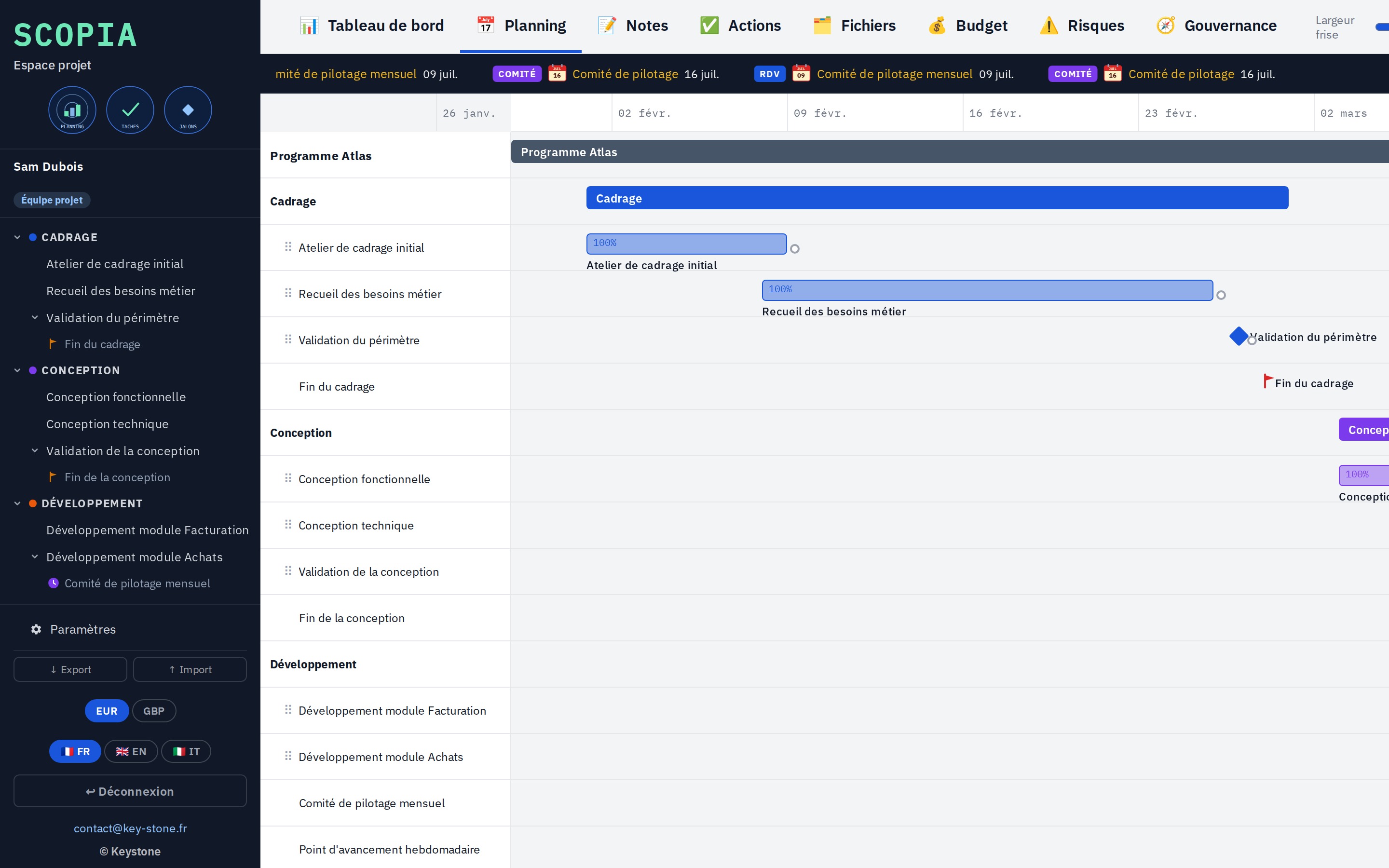
A Gantt chart with the project phases, tasks, milestones and meetings. Tasks slide along the timeline, progress is entered as a percentage. Milestones mark the key points.

  • Phases, tasks, milestones and dated meetings
  • Drag and drop on the timeline, dependencies between tasks
  • Progress per task and per phase
key-stone.fr/scopia
Scopia, Gantt planning with phases, tasks and milestones
02 · Budget

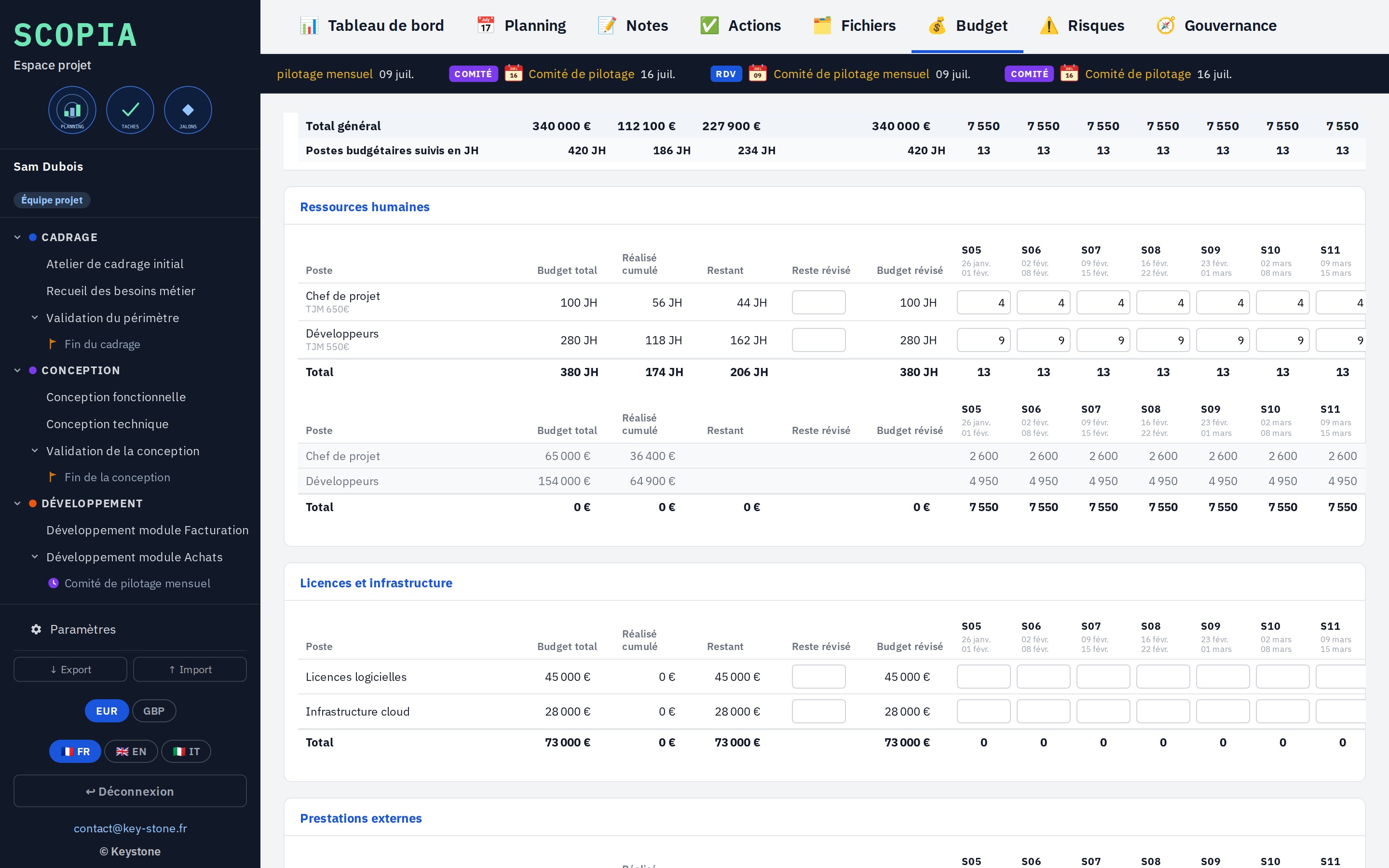
Budget tracked week by week

Budget lines, in person-days or euros, with actuals entered week after week. Scopia compares planned and spent, and projects the consumption ahead.

  • Lines in person-days with a daily rate, or in euros
  • Weekly actuals, remaining to spend
  • Configurable budget headings and types
key-stone.fr/scopia
Scopia, weekly budget tracking by line
03 · Risks

Risks rated and tracked

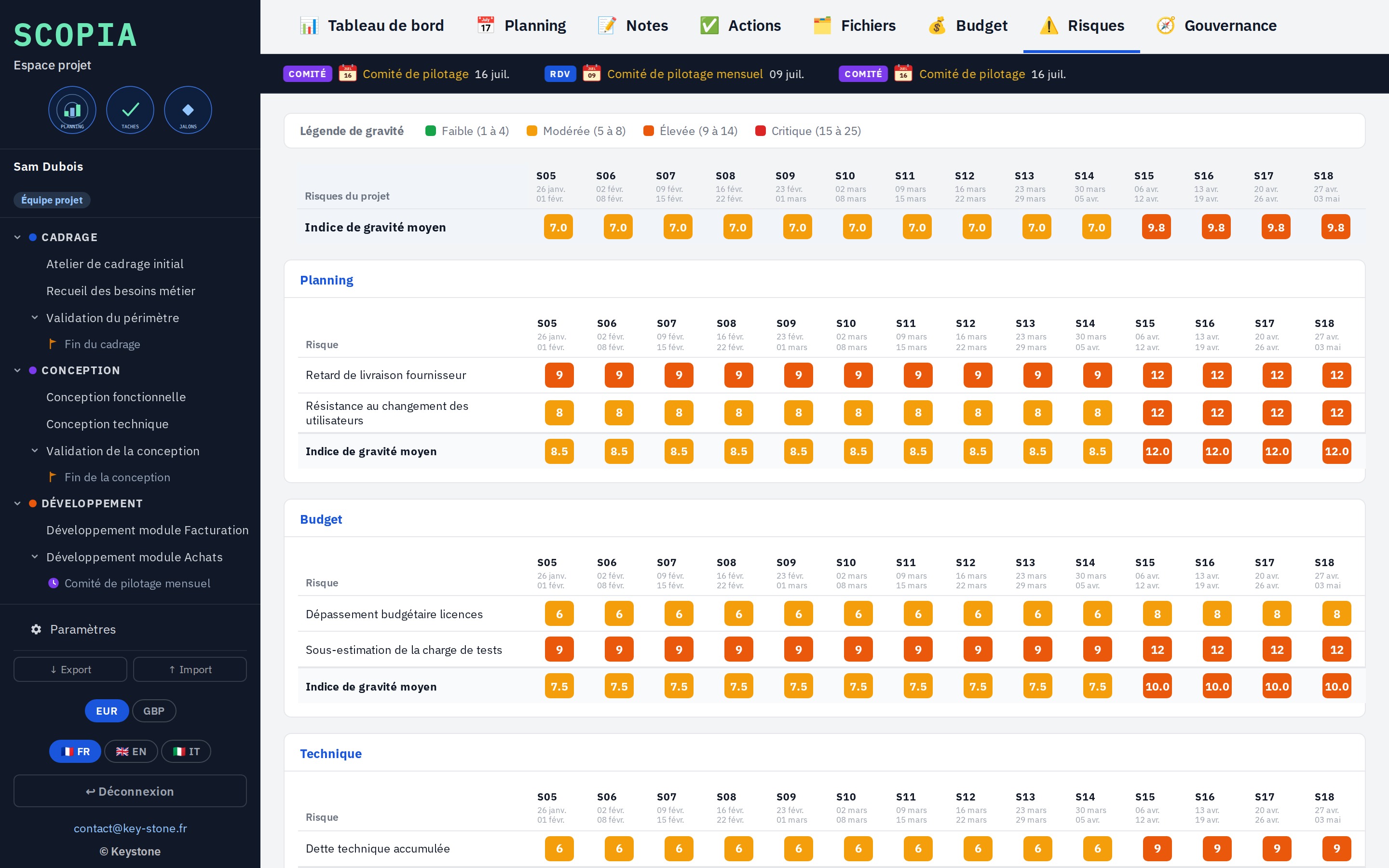
Each risk is described, sorted by category, then rated every week on impact and probability. Scopia derives a severity and traces its evolution over time.

  • Impact and probability on a scale of 1 to 5
  • Computed severity, sorted by priority
  • Evolution week after week
key-stone.fr/scopia
Scopia, risk rating and severity evolution
04 · Governance

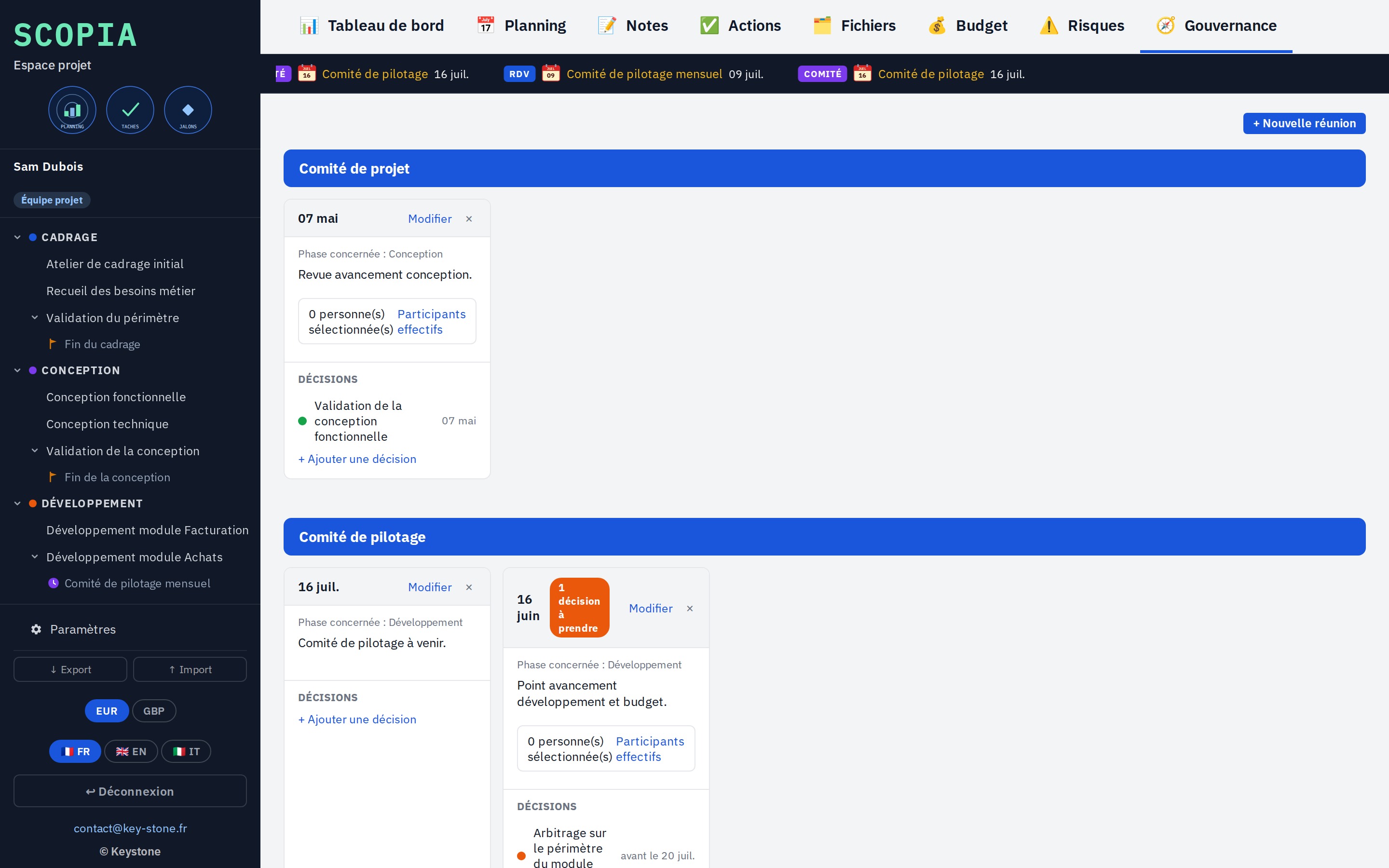
Committees and decisions

The project committees, their meetings tied to phases, and the decisions taken or pending. Each decision keeps its date, status and due date.

  • Project and steering committees
  • Meetings tied to phases
  • Decisions taken or pending, with a due date
key-stone.fr/scopia
Scopia, governance with committees, meetings and decisions
05 · Health index

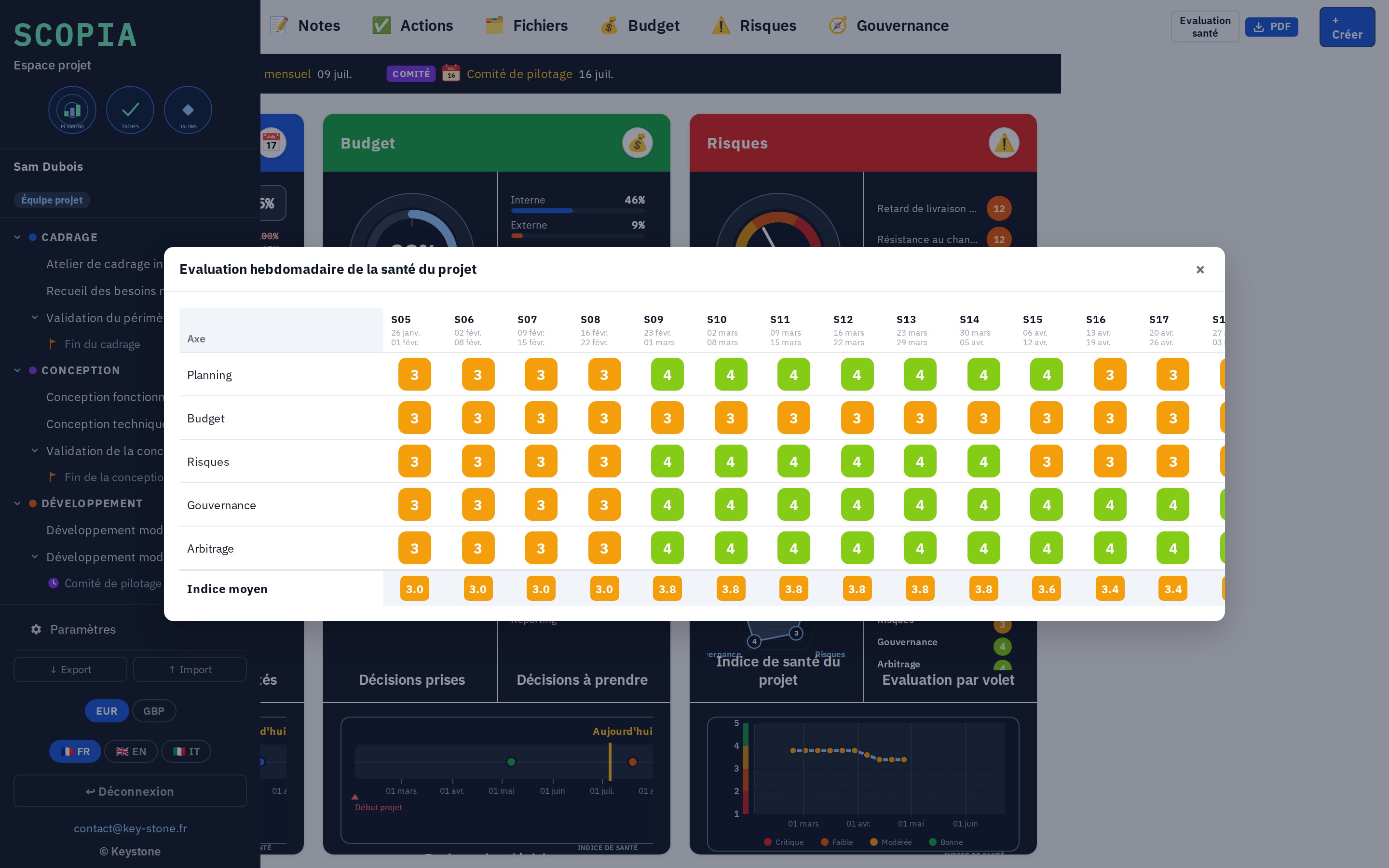
The project health, every week

Every week, the project is scored on five areas: planning, budget, risks, governance, arbitration. Scopia derives an average index and traces the curve. You see at once whether the project is degrading.

  • Five areas scored from 1 to 5 each week
  • Average index and evolution curve
  • Carried straight over to the dashboard
key-stone.fr/scopia
Scopia, weekly project health assessment
06 · Output

The dashboard, as a PDF

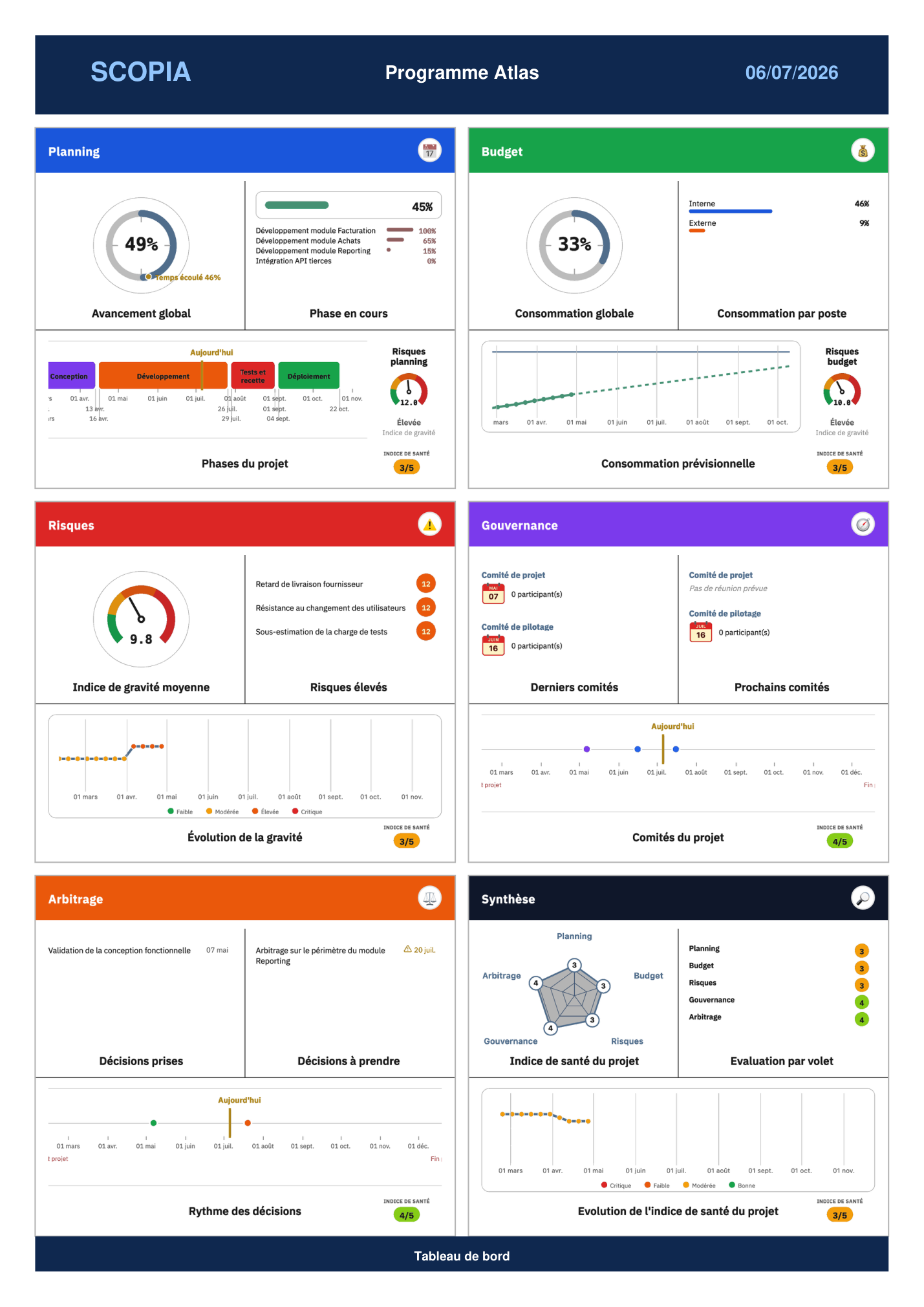
In one click, Scopia exports the dashboard as a PDF: planning, budget, risks, governance, arbitration and health index. A clean document, ready to present to the steering committee.

  • All indicators on one page
  • Planning, budget, risks and health
  • Layout ready to present
Scopia, dashboard exported as a PDF
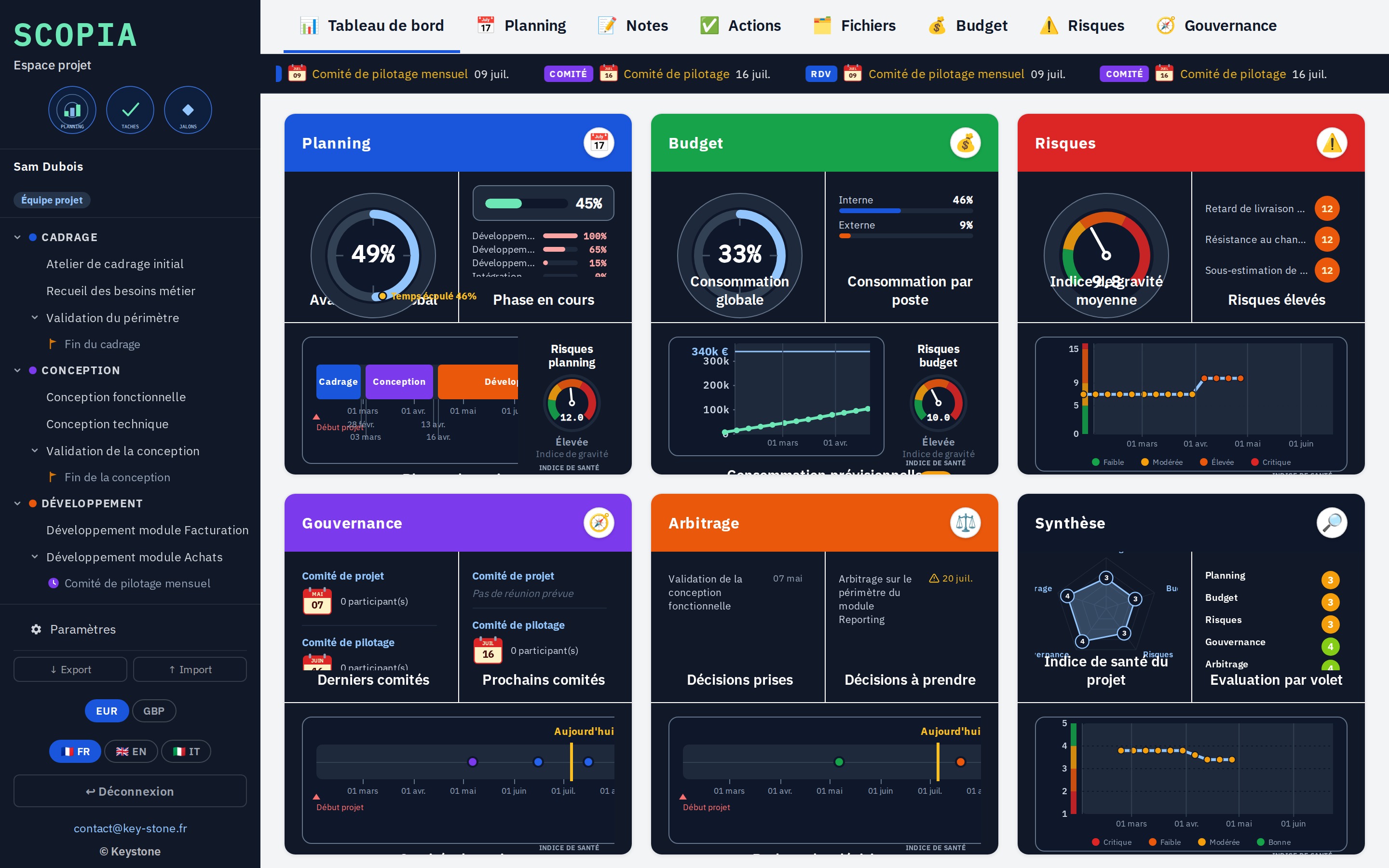
A single screen. planning, budget, risks and governance are read from the dashboard.
Health index. computed from the weekly assessments, evolution curve.
Multi-currency. person-days with a daily rate or euros, pound conversion available.
Project sharing. JSON export and import to archive or hand over the project.
03
Roles and reading

Who builds, who consults

A project is built by several hands, but not everyone edits. Scopia separates three roles: the project team builds, the steering committee follows, the contributor consults.

01 · Three roles

Each with their access

The project team fills and updates the project: planning, budget, risks, decisions. The steering committee opens and reads everything, without editing. The contributor sees the dashboard and the planning.

  • Project team, steering committee, contributor
  • Login by role, an access of its own for each
  • Only the project team edits; the others are read-only
key-stone.fr/scopia
Scopia, consolidated project dashboard
04
Strengths

Light, standalone, yours

Free

Local prototype

Discover the tool and how it works at no cost and no commitment.

No install

In the browser

One file, no software to install, no account to create.

Privacy

Data stays local

Everything stays in your browser. No data is sent to a server.

Languages

Trilingual

Interface in French, English and Italian.

Output

PDF export

The full dashboard, laid out, ready to present.

Calculation

Health index

A consolidated index computed from the weekly assessments.

05
Who it is for

Those who steer a project

Scopia is for those who run a project and those who follow its progress.

Project manager IT department PMO and project governance Transformation office Business owner side SME executive
06
Keystone services

The tool is free. Rollout is a service.

Discovering Scopia locally costs nothing. Putting it truly at the service of your steering means adapting it to your context, your projects and your decision bodies. That is Keystone's role.

01

Steering framing

Define the standard phases, the health areas and the decision circuit of your projects.

02

Configuration

Budget headings, risk categories, committees and daily rates set to your context.

03

Setting up the tracking

Help teams keep the planning, budget and risks up to date.

04

Training

Make your teams autonomous on the tool and the steering method.

05

Project governance and PMO

Set up and run project steering over time.

06 · Rollout

Scopia in network

A hosted version where all users work on the same base, with no file exchange. Access rights, centralized data, sovereign hosting if needed.

Write to Keystone contact@key-stone.fr
Scopia

Try it on a real project.

Open the tool, look at the sample project, then replace it with your own. In a few minutes, you have a full dashboard.