Keystone application · Development business plan

Ergos

A development project stays vague until it is costed. Ergos turns it into a structured business plan: the market, the offer, the costs and the financing follow on from each other, and profitability is computed on its own.

Open the application To try it right away, with nothing to install
Download ↓ To keep it on your machine and work on your own projects
Getting-started guide ↓ To understand the tool before opening it
Free · No data sent
01
The problem

Costing a project without a method

A project owner has to prove the idea holds up. But the business plan often ends up in a patched-together spreadsheet, redone with every version. Assumptions are scattered, profitability is rough, and the market is guessed.

  • The market is set with no method, with no link to a realistic number of customers
  • Costs and investments are mixed together, with no view of the cash need
  • No reliable indicator to decide: no NPV, no IRR, no payback
  • Financing is handled separately, disconnected from the income statement
  • The whole thing rests on a fragile file, hard to present to a funder
02
How it works

From market to financing, in the right order

Ergos gives a single framework. The business plan is built step by step, in logical order: you frame the project, size the market, describe the offer, set out the costs and financing. Profitability is computed along the way, over the whole horizon.

01 · Framing

Frame the project

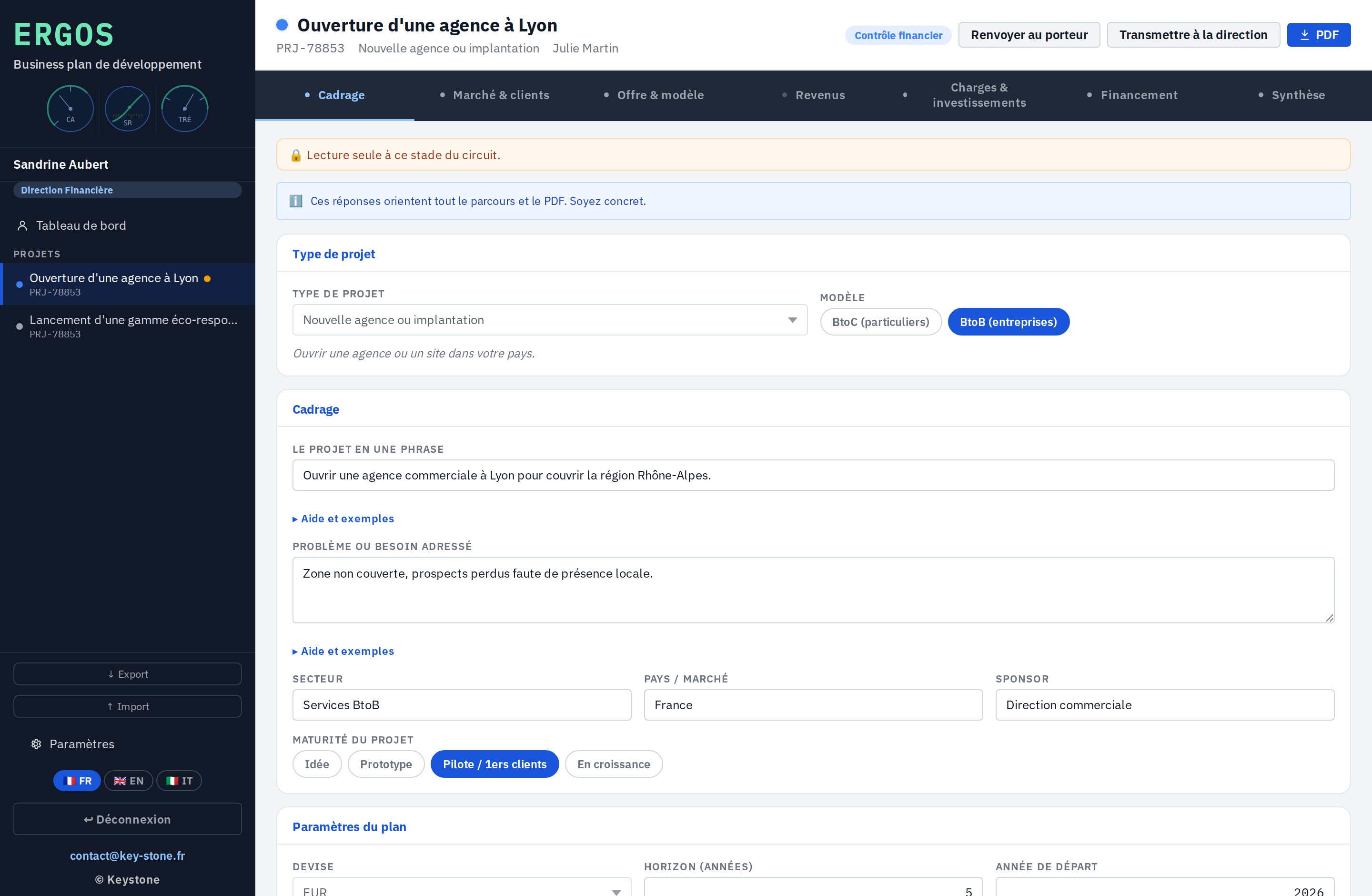
You set the scene: the type of project, the BtoB or BtoC model, the sector, the projection horizon. Everything else in the business plan adapts to these starting choices.

  • Type of project and business model
  • Adjustable projection horizon
  • Currency and start year
key-stone.fr/ergos
Ergos, project framing screen
02 · Market & customers

Size the market

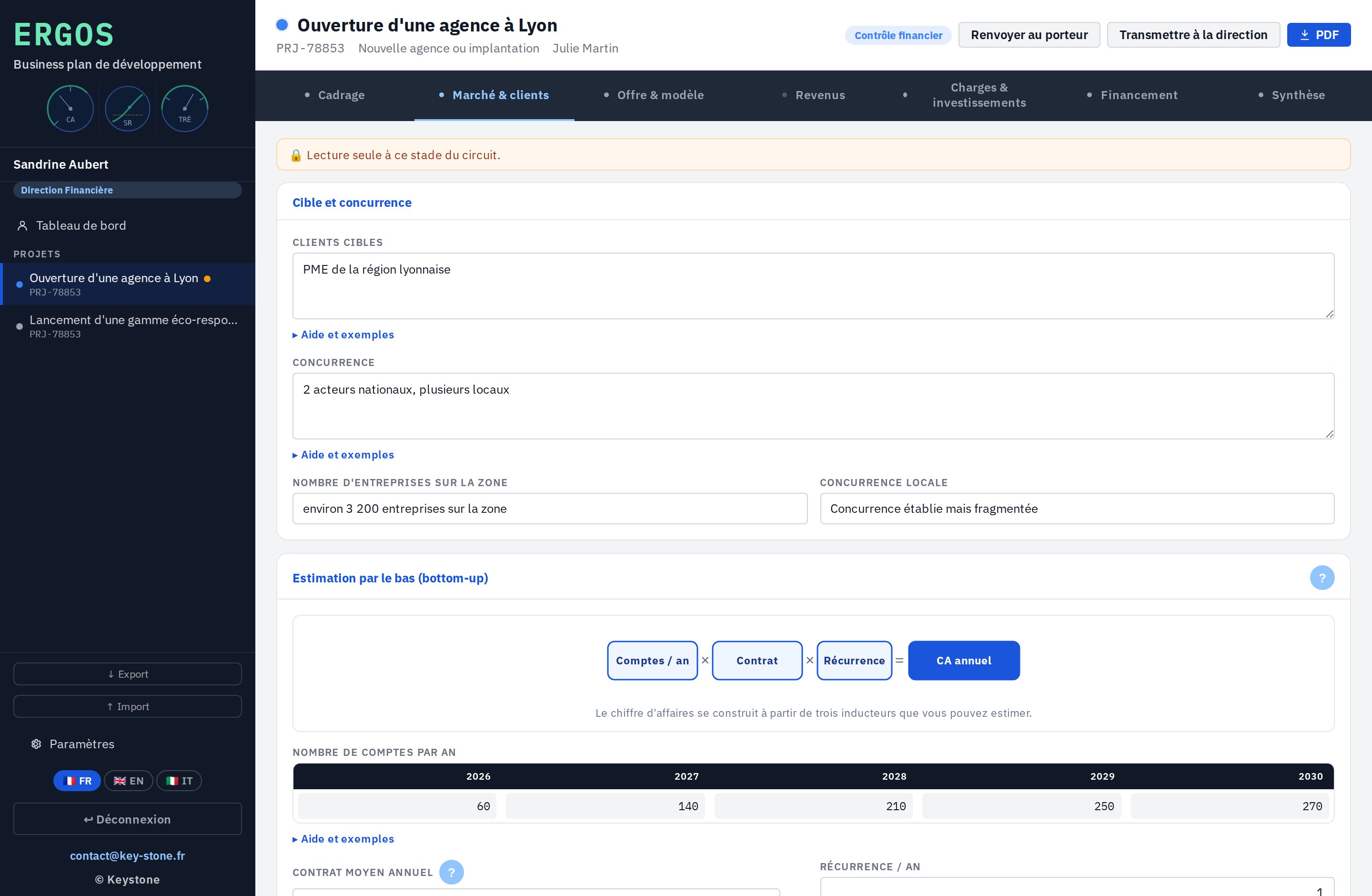
Revenue is not guessed, it is built. Number of customers, average basket, purchase frequency: Ergos derives revenue year by year, and carries it over to the revenue tab on its own.

  • Bottom-up approach: customers, basket, frequency
  • Revenue computed over the whole horizon
  • Automatic carry-over to revenue
key-stone.fr/ergos
Ergos, market and customers screen
03 · Costs & investments

Costs and investments

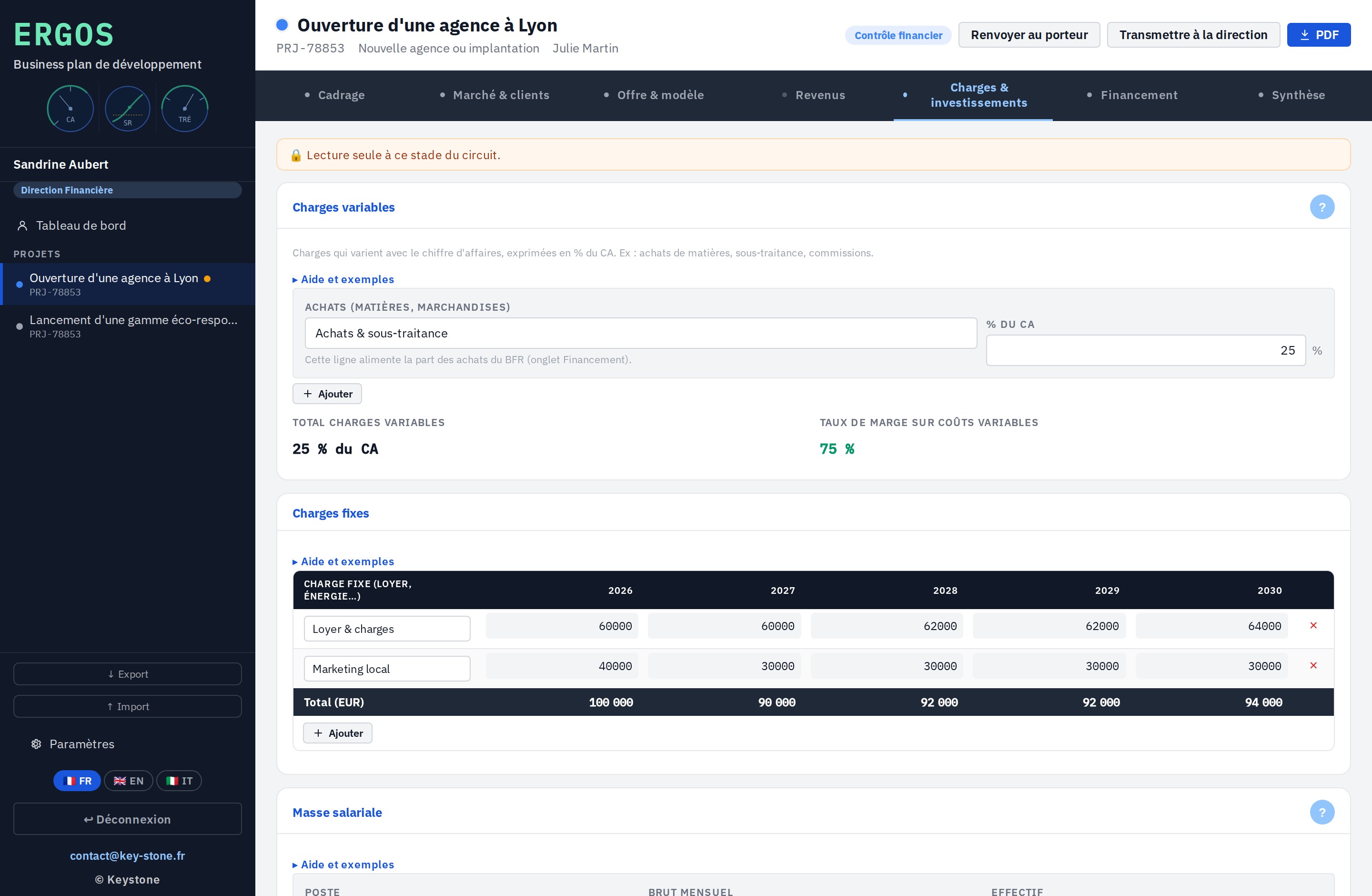
Variable costs as a percentage of revenue, fixed costs, payroll at employer cost, investments depreciated. The Purchases line feeds the working capital need directly.

  • Variable costs, fixed costs and payroll
  • Investments depreciated over their life
  • Employer cost, payroll taxes included
key-stone.fr/ergos
Ergos, costs and investments screen
04 · Financing

The financing plan

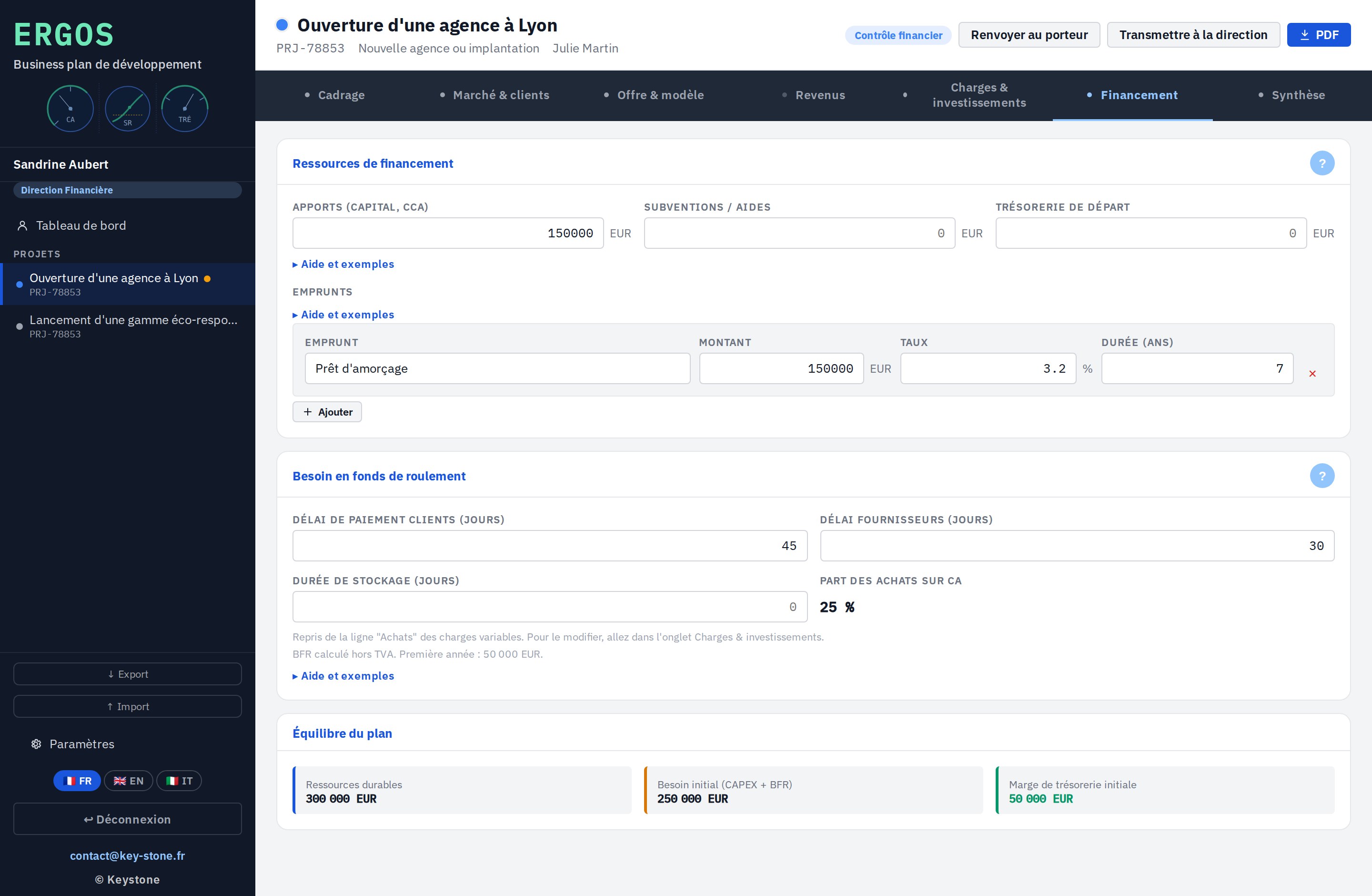
Equity, grants and loans on one side; the start-up need on the other. Ergos computes the working capital need and checks the balance: does what you put in cover what the project needs?

  • Equity, grants and loans
  • Working capital need computed
  • Resources against needs
key-stone.fr/ergos
Ergos, financing screen
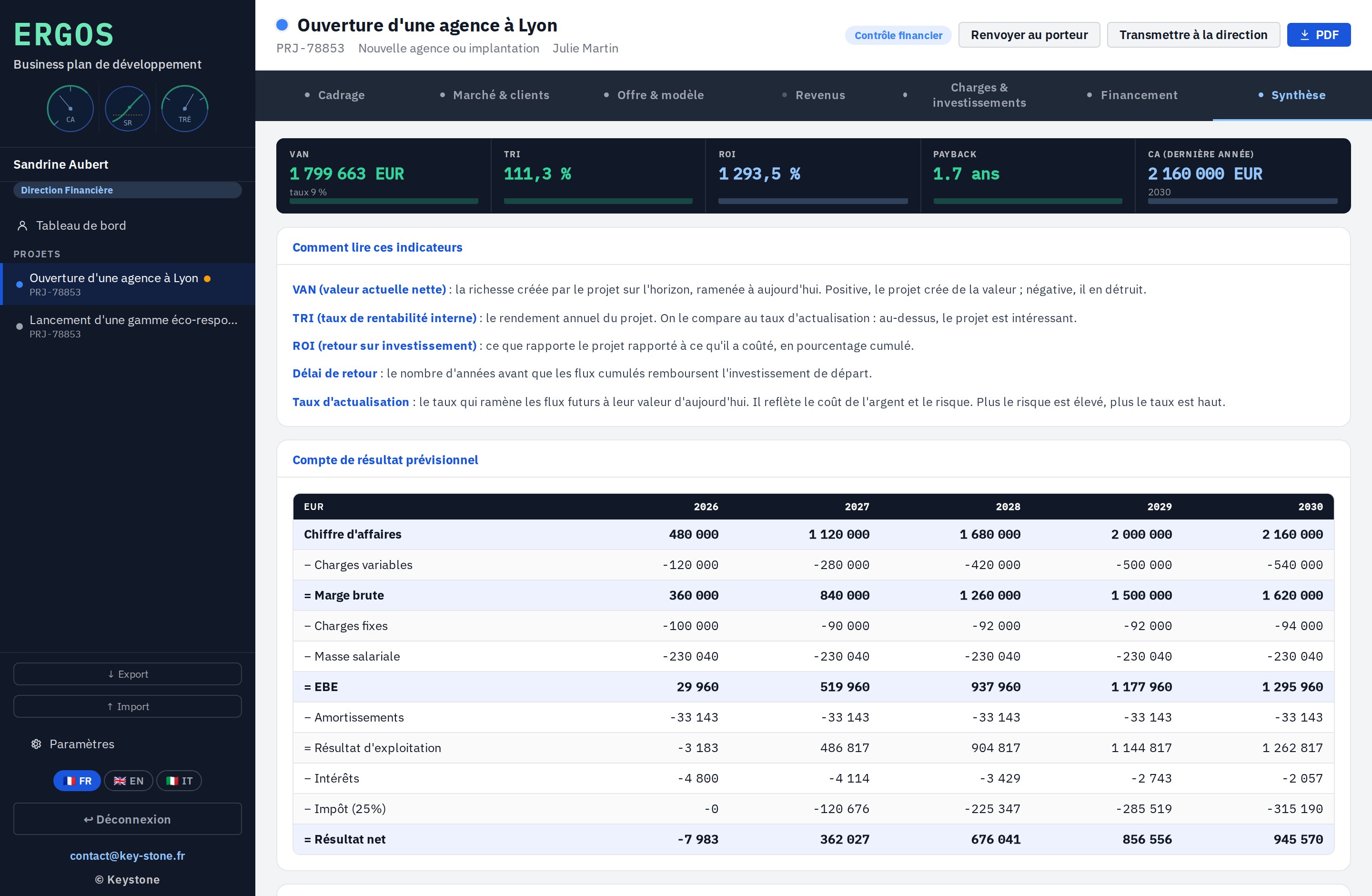
05 · Synthesis

Profitability, computed on its own

This is where everything comes together. Ergos computes NPV, IRR, ROI and payback, and lays out the projected income statement over the whole horizon. Each indicator is explained so it can be read without being an expert.

  • NPV, IRR, ROI and payback
  • Full projected income statement
  • Each indicator explained in plain words
key-stone.fr/ergos
Ergos, financial synthesis screen
06 · Output

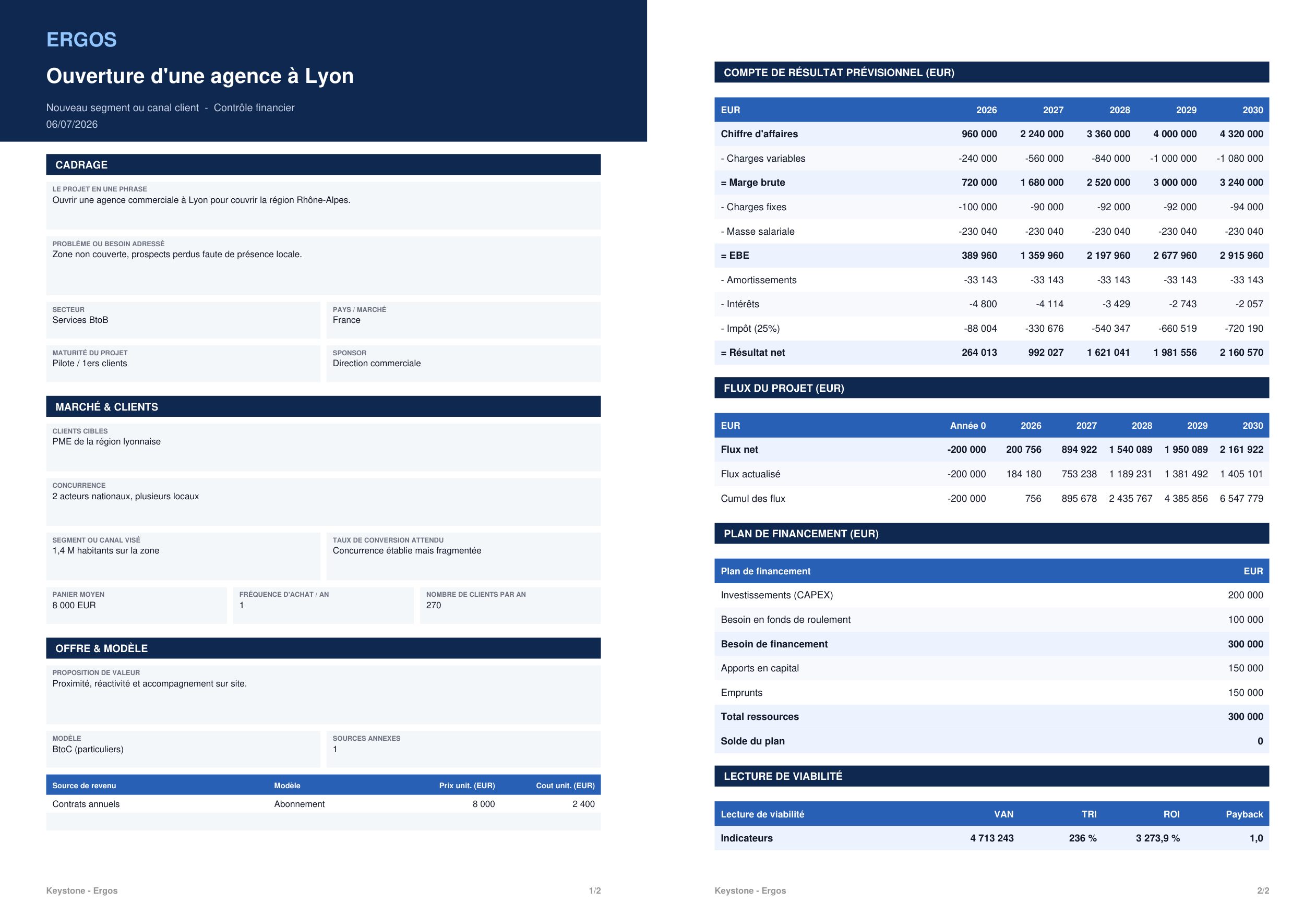
The complete business plan, as a PDF

Once the plan is filled in, Ergos exports it as a PDF: framing, market, offer, projected income statement, financing plan and viability reading. A clean document, ready to present to a banker, an investor or a committee.

  • All sections across two pages
  • Income statement, cash flows and financing plan
  • Layout ready to present
Ergos, business plan exported as a PDF
Validation flow - the business plan moves from the owner to finance control, then to the management decision.
Built-in help - every field explains what to enter, with examples and orders of magnitude.
Multi-currency - euro and dollar.
PDF export, JSON export and import - share the plan, or exchange it between machines.
03
Strengths

Light, self-contained, yours

Free

Local prototype

Explore the tool and how it works, at no cost and with no commitment.

No install

In the browser

One file, no software to install, no account to create.

Privacy

Data stays local

Everything stays in your browser. No data is sent to a server.

Languages

Trilingual

Interface in French, English and Italian.

Help

Guided step by step

Every field explains what to enter, with concrete examples.

Calculation

Built-in profitability

NPV, IRR, ROI, payback and income statement computed on their own.

04
Who it is for

Those who carry a project

Ergos is for those who carry a development project and have to cost it, and for those who fund or validate it.

Project owner Finance department Management control Business development SME director Founder
05
Keystone services

The tool is free. Implementation is an engagement.

Exploring Ergos locally costs nothing. Putting it to real work on your projects means adapting it to your context, your assumptions and your decision-makers. That is Keystone's role.

01

Project framing

Clarify the scope, the target market and the business model.

02

Configuration

Sectors, assumptions, costs and currencies set to your context.

03

Building the business plan

Support the costing of the market, the costs and the financing.

04

Training

Make your teams self-sufficient on the tool and the method.

05

Critical review

Challenge the assumptions and secure profitability before the decision.

06 · Deployment

Ergos on a network

A hosted version where all users work on the same base, with no file exchange. Access rights, centralised data, sovereign hosting if needed.

Email Keystone contact@key-stone.fr
Ergos

Try it on a real project.

Open the tool, look at the sample business plan, then replace it with your own project. In a few minutes, you have a costed profitability and an income statement.