Keystone application · Occupational risks

Clavis

The single risk-assessment document is a legal duty, but it rarely lives beyond the binder. Clavis structures the assessment unit by unit, rates each hazard, and ties every risk to an action plan. The risk register keeps itself up to date.

Open the app To try it right away, with nothing to install
Download ↓To keep it on your machine and work on your units
Getting-started guide ↓To understand the tool before opening it
Free · No data sent
01
The problem

A risk register gathering dust in a binder

The single occupational risk-assessment document is mandatory. Often it is written once, filed away, and never reopened. The assessment ages, the action plan gets lost, the yearly update becomes a chore.

  • The assessment sits in a spreadsheet or a frozen document, never tied to the field
  • Hazards are not rated the same way from one unit to the next
  • The action plan lives apart, with no link to the risks that triggered it
  • No one knows where the actions stand, or who owns them
  • The yearly review starts from scratch, with no history from last year
02
How it works

A hazard, a rating, an action plan

Clavis gives a single frame. Every hazardous situation is rated on a common grid. The action plan plugs straight into the risks, and the single document is generated from all of it.

01 · Assessment

Rate each risk on a common grid

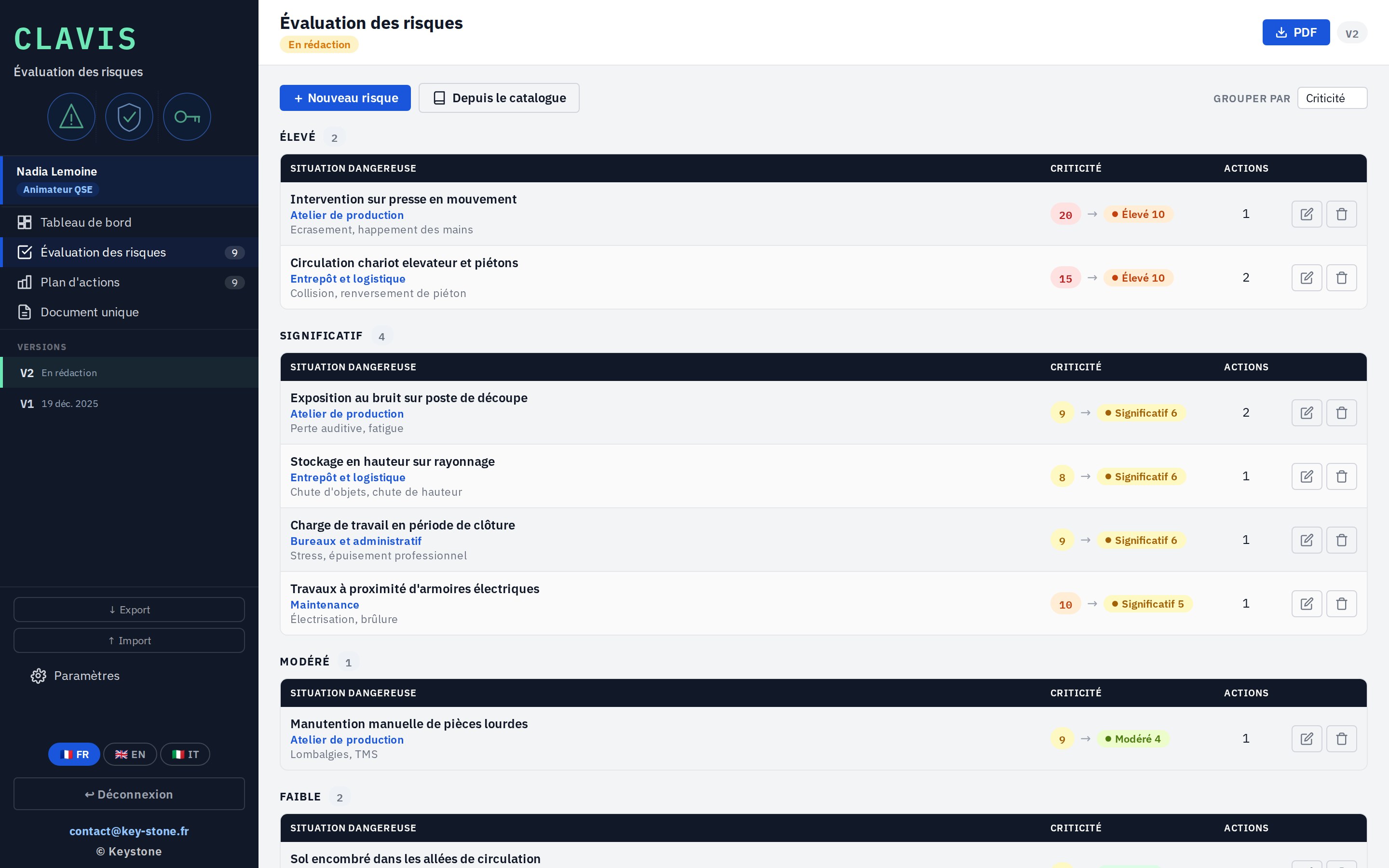
Each hazardous situation is described by work unit, then rated on severity and likelihood. Clavis derives a criticality, from Low to Critical, and sorts risks by priority.

  • Severity × likelihood on a common scale
  • Criticality from Low to Critical, colour-coded
  • Automatic sorting by descending criticality
key-stone.fr/clavis
Clavis, risk assessment screen by criticality
02 · Action plan

Tie each action to its risk

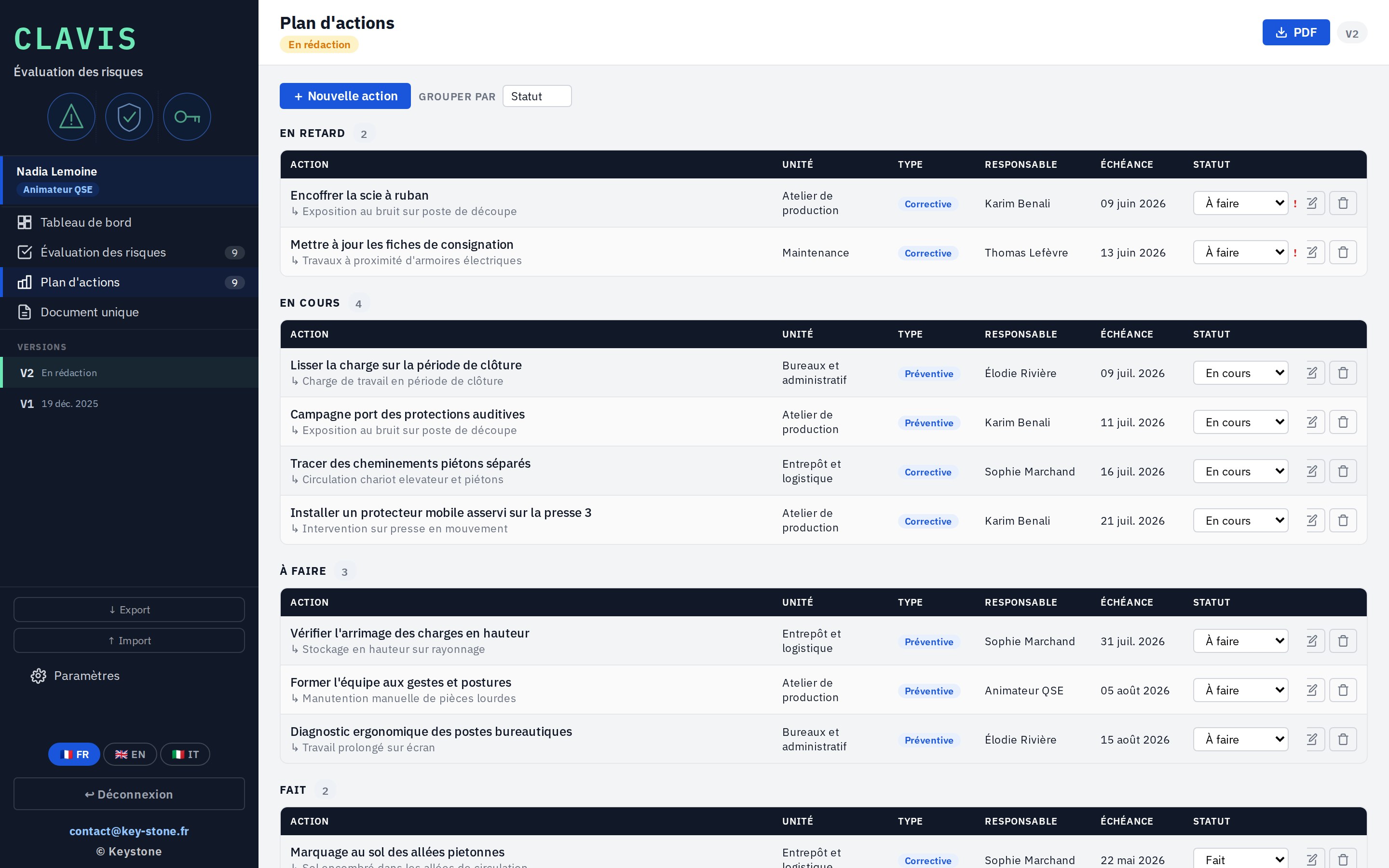
To each risk you attach corrective actions. Each has an owner, a unit, a due date and a status. Clavis tracks what is open, overdue, or closed.

  • Actions tied to the assessed risks
  • Owner, unit, due date and status
  • Tracking of open and overdue actions
key-stone.fr/clavis
Clavis, action plan tied to risks
03 · Single document

The single document, generated on its own

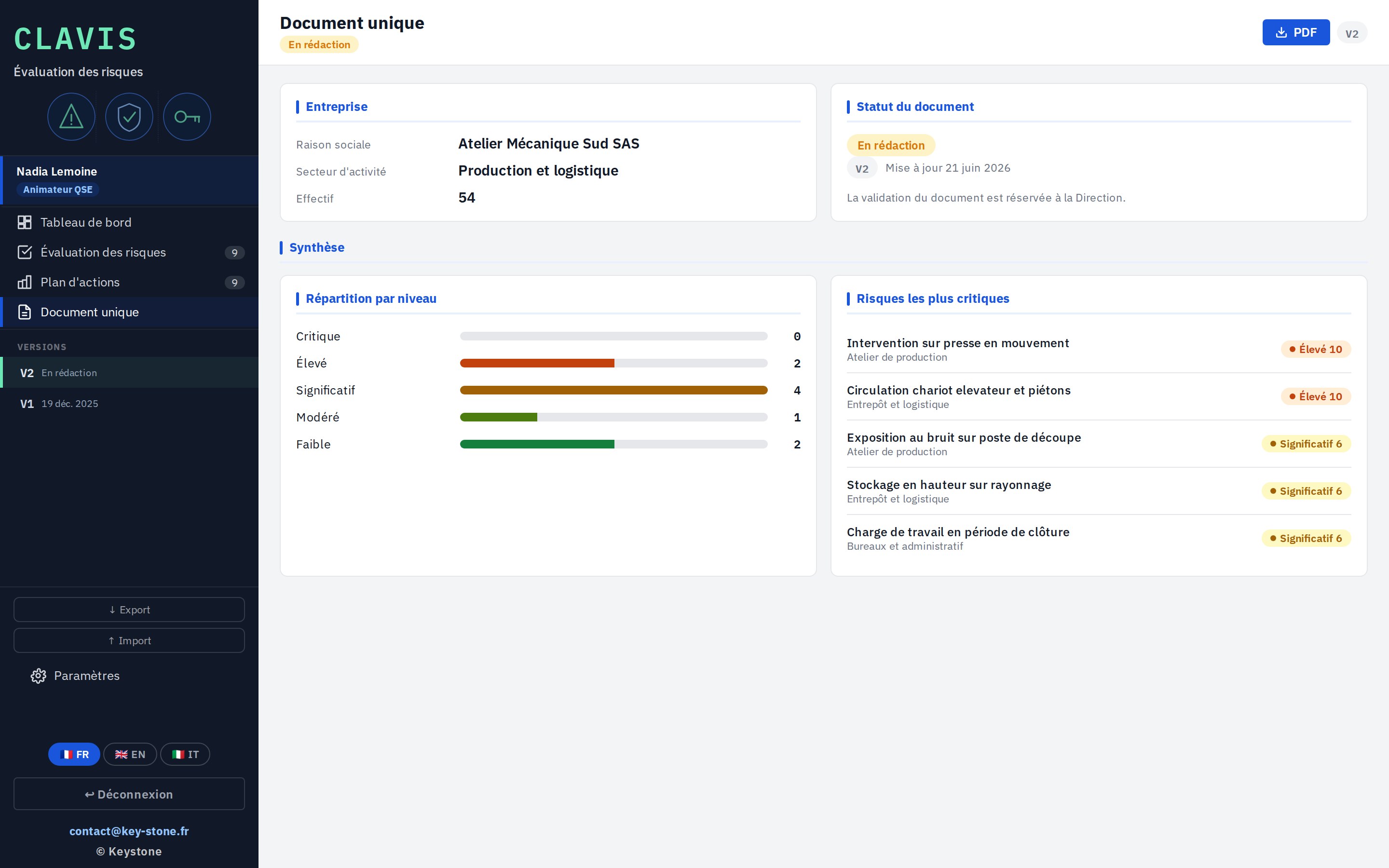
From the assessment and the action plan, Clavis assembles the single document: company name, headcount, breakdown of risks by level, most critical risks. Ready to export as PDF.

  • Company and headcount summary
  • Breakdown of risks by level
  • PDF export of the full document
key-stone.fr/clavis
Clavis, single document with risk summary
04 · Dashboard

See everything at a glance

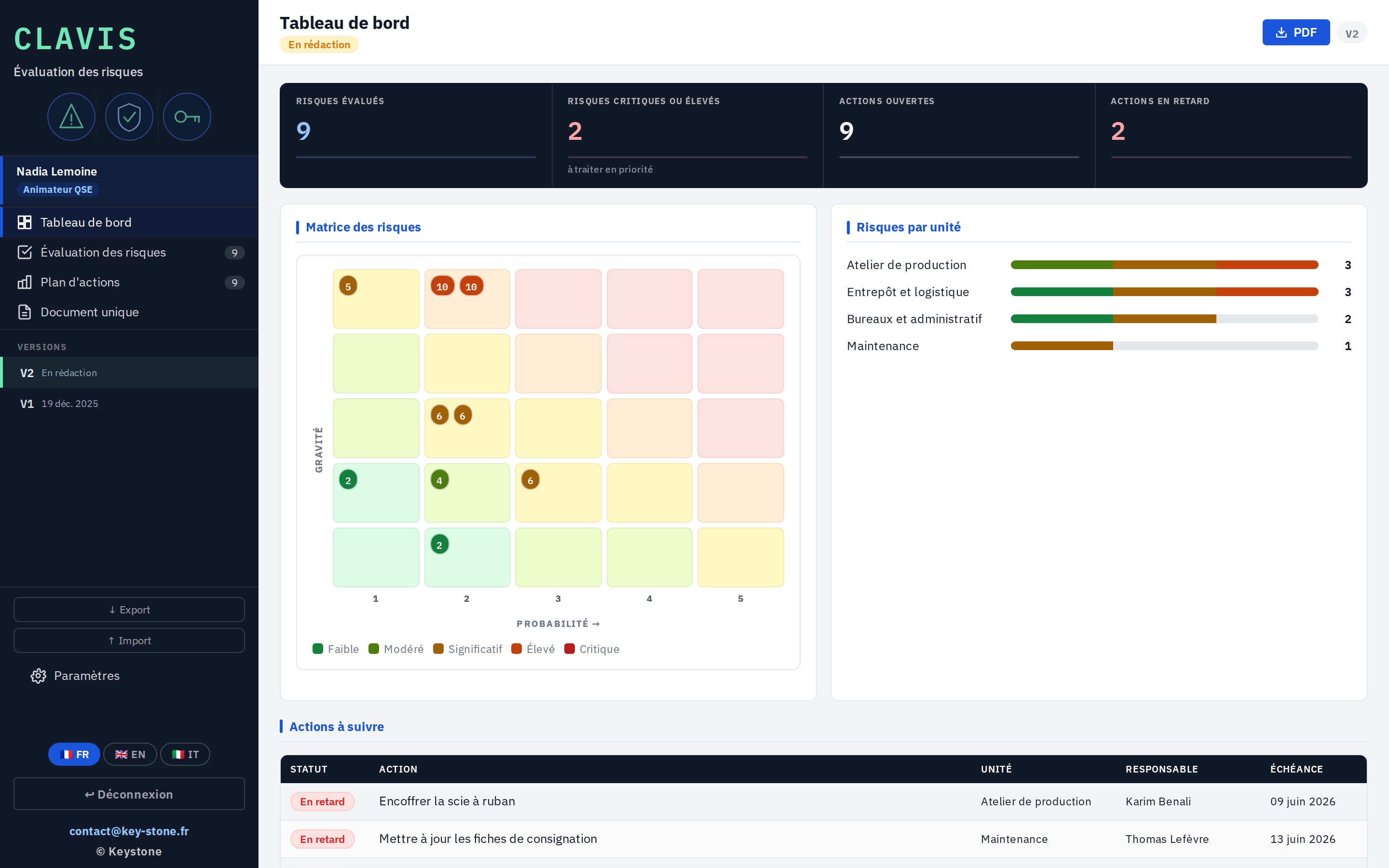
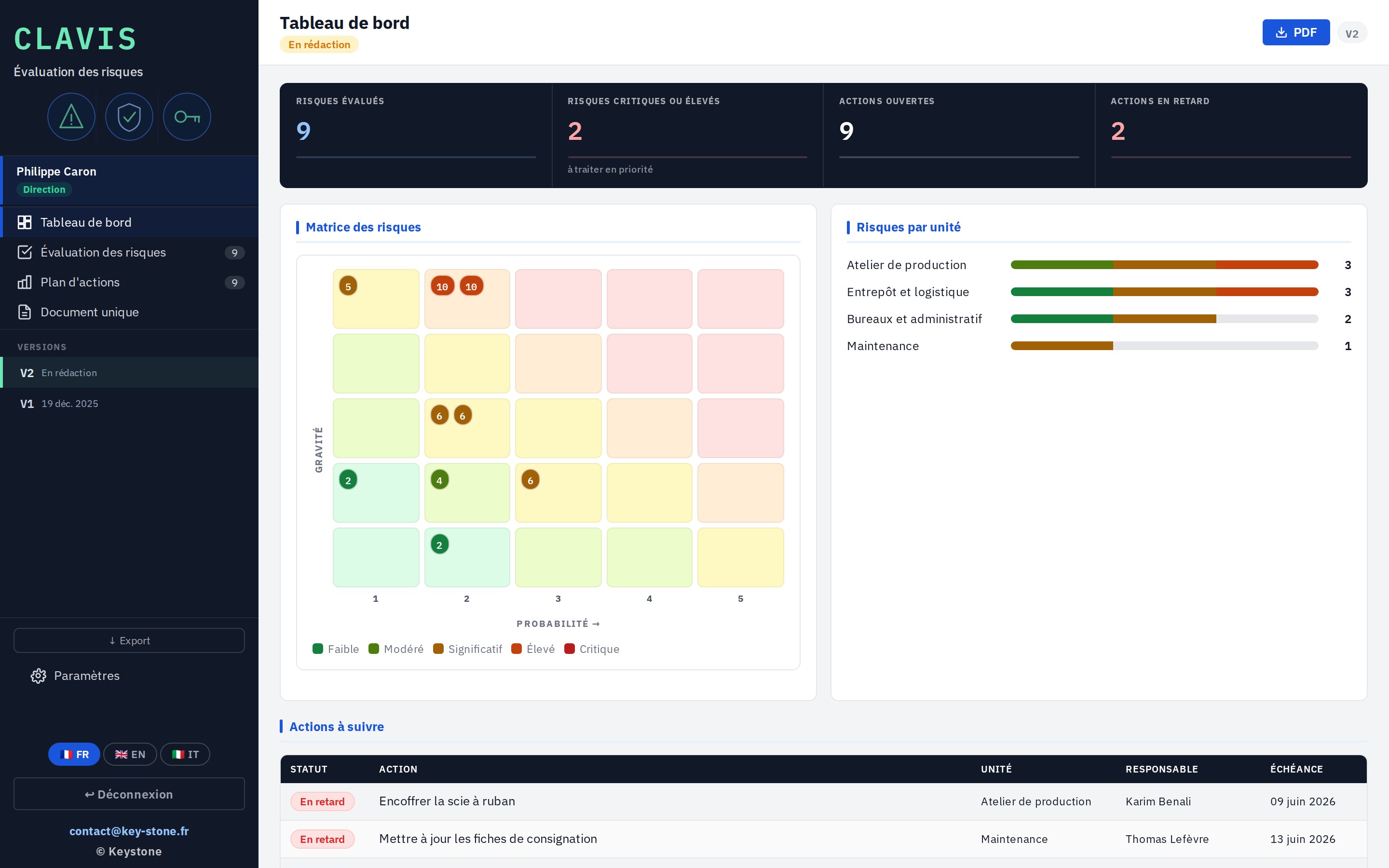
The dashboard brings together the essentials: risks assessed, critical risks, open and overdue actions. A severity / likelihood matrix and the per-unit breakdown complete the view.

  • Assessed and critical risks at a glance
  • Open and overdue actions
  • Risk matrix and per-unit view
key-stone.fr/clavis
Clavis, dashboard with risk matrix
05 · Output

The single document, as a PDF

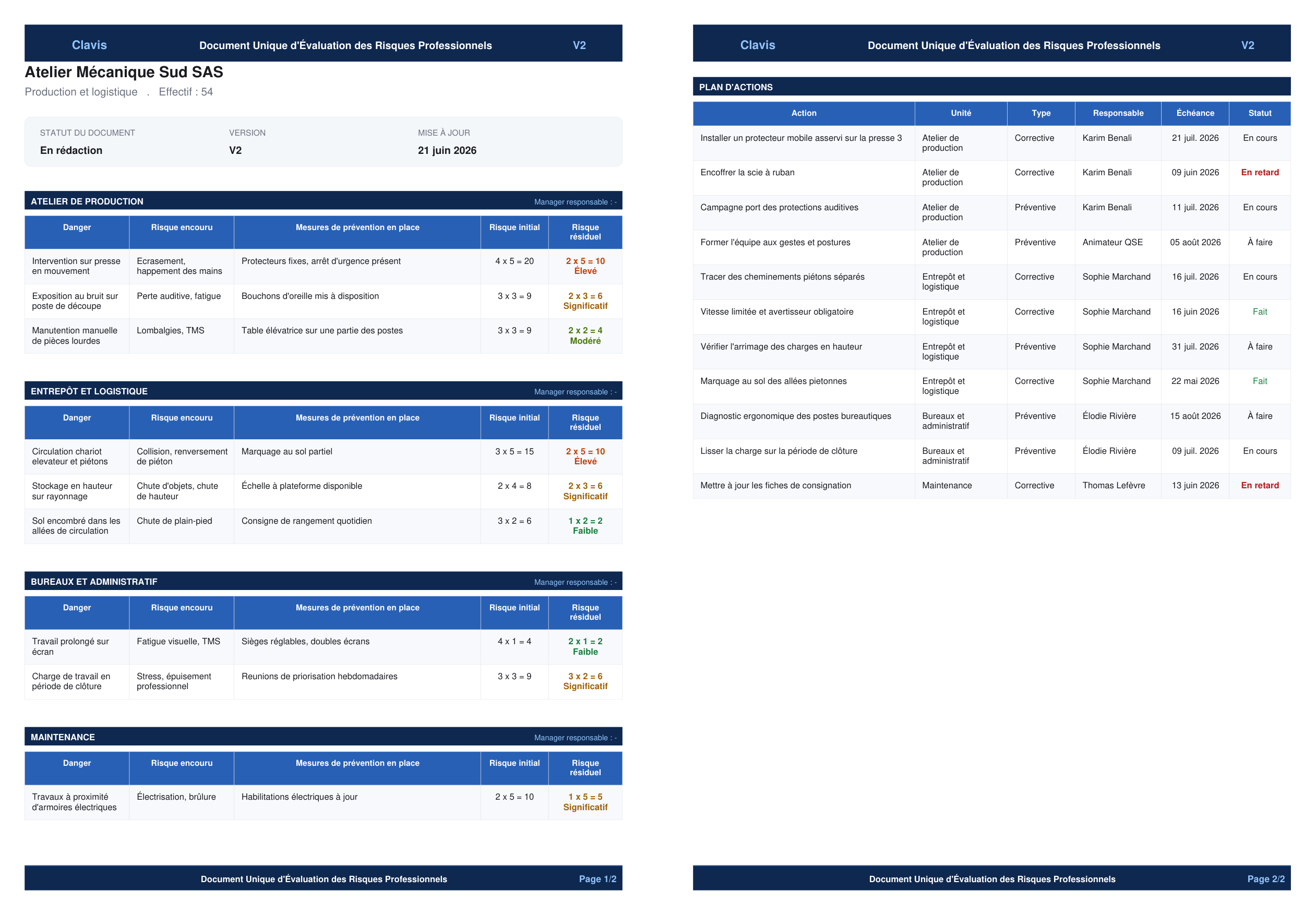
The single document exports to PDF: cover page, company summary, risks by unit with prevention measures and criticality, then the full action plan. A document ready to share and archive.

  • Cover page and company summary
  • Risks by unit, measures and criticality
  • Full action plan appended
Clavis, single document exported as a two-page PDF
Versions — each review is kept, from one year to the next.
Hazard catalogue — start from a library of typical situations.
PDF export — the full single document, ready to share.
Export and import — save and reload the assessment between machines.
03
The three roles

From HSE officer to management

An assessment does not live alone. Clavis splits the cycle between three roles: the HSE officer builds and rates, the manager follows their unit's actions, management approves the single document.

01 · HSE officer

Enter, rate, plan

The HSE officer builds the assessment: describes the hazardous situations, rates them, and sets up the action plan. They keep the whole thing up to date, from one version to the next.

  • Risk entry and rating
  • Building the action plan
  • Keeping the assessment up to date
key-stone.fr/clavis
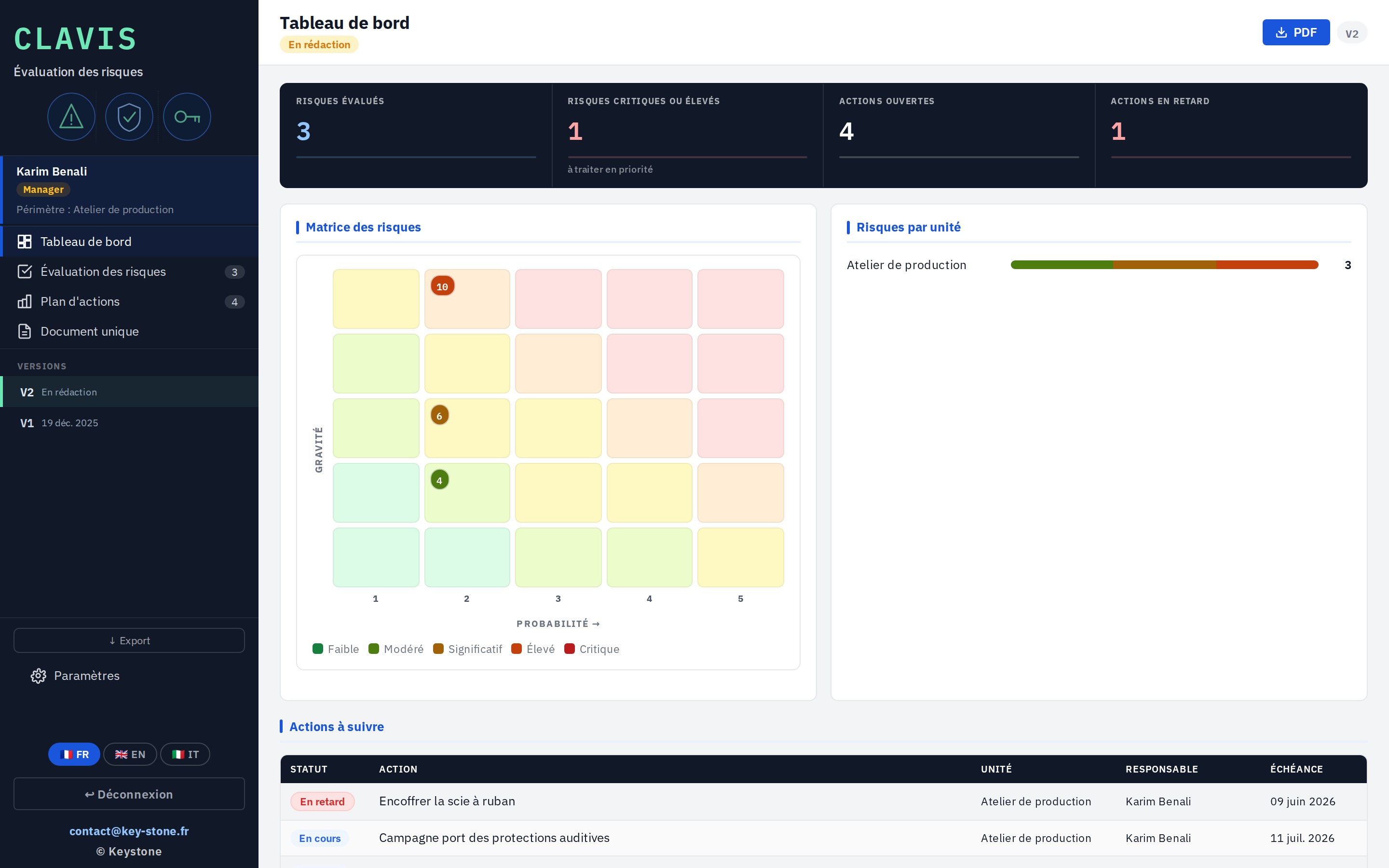
Clavis, HSE officer screen
02 · Manager

Follow their unit's actions

The manager, head of a unit, sees the risks and actions in their scope. They track progress, flag a situation, and escalate what is stuck.

  • Scope limited to their unit
  • Tracking of the unit's actions
  • Flagging hazardous situations
key-stone.fr/clavis
Clavis, manager view limited to their unit
03 · Management

Approve the single document

Management keeps the overview: all risks, all units. They approve the single document and sign off each new version.

  • Overview of all risks
  • Approval of the single document
  • Sign-off of successive versions
key-stone.fr/clavis
Clavis, management view over all units
04
Strengths

Light, self-contained, yours

Free

Local prototype

Explore the tool and how it works at no cost, no commitment.

No install

In the browser

One file, no software to install, no account to create.

Privacy

Data stays local

Everything stays in your browser. No data is sent to a server.

Languages

Trilingual

Interface in French, English and Italian.

Output

PDF export

The full single document, laid out, ready to share.

Rating

Built-in matrix

Severity and likelihood combined into a clear criticality.

05
Who it's for

Those who carry prevention

Clavis is for those who carry risk assessment and workplace safety.

HSE officer or managerHSE leadHuman resourcesUnit or site managerSME directorPrevention adviser and consultant
06
Keystone services

The tool is free. Rollout is an engagement.

Trying Clavis locally costs nothing. Fitting it to your units, your hazards and your approval flows takes support. That is Keystone's role.

01

Framing the assessment

Define the scope, the work units and the rating grid.

02

Configuration

Hazard catalogue, units and criticality levels set to your activity.

03

Assessment method

Structure the assessment and action plan against your obligations.

04

Training

Make your teams self-sufficient on the tool and the prevention approach.

05

Prevention management

Set up action tracking and the yearly review over time.

06 · Rollout

Clavis on the network

A hosted version where the HSE officer, managers and management work on the same base. Access rights, centralised data, sovereign hosting if needed.

Write to Keystone contact@key-stone.fr
Clavis

Try it on your units.

Open the tool, look at the sample assessment, then replace it with your units and your risks. In a few minutes, you have an up-to-date single document.