Keystone application · Audit engagements

Auditia

An audit engagement quickly scatters across interview notes, tracking spreadsheets and email chases. Auditia structures the whole cycle: planning, interviews, coded recommendations and their validation, through to completion. Each recommendation follows a clear path between the auditor, the audit director and the manager.

Open the app To try it right away, with nothing to install
Download ↓ To keep it on your machine and work on your engagements
Get-started guide ↓ To understand the tool before opening it
Free · No data sent
01
The problem

An audit engagement scattered everywhere

Planning, interviewing, drafting recommendations, having them validated then tracked: an audit engagement passes through many hands. Without a dedicated tool, it scatters, and tracking the recommendations becomes impossible to keep up.

  • The schedule and interviews live in documents separate from the rest
  • Recommendations are not coded or numbered reliably
  • Validation between auditor and director happens by email, with no trace
  • Nobody knows where a recommendation stands, or who must act
  • Overdue items and the completion rate are measured nowhere
02
How it works

From planning to recommendation

Auditia gives the engagement a single frame. You plan the steps, attach the interviews, write the recommendations, and the validation cycle flows on its own. The dashboard tracks progress.

01 · Schedule

Plan the engagement in steps

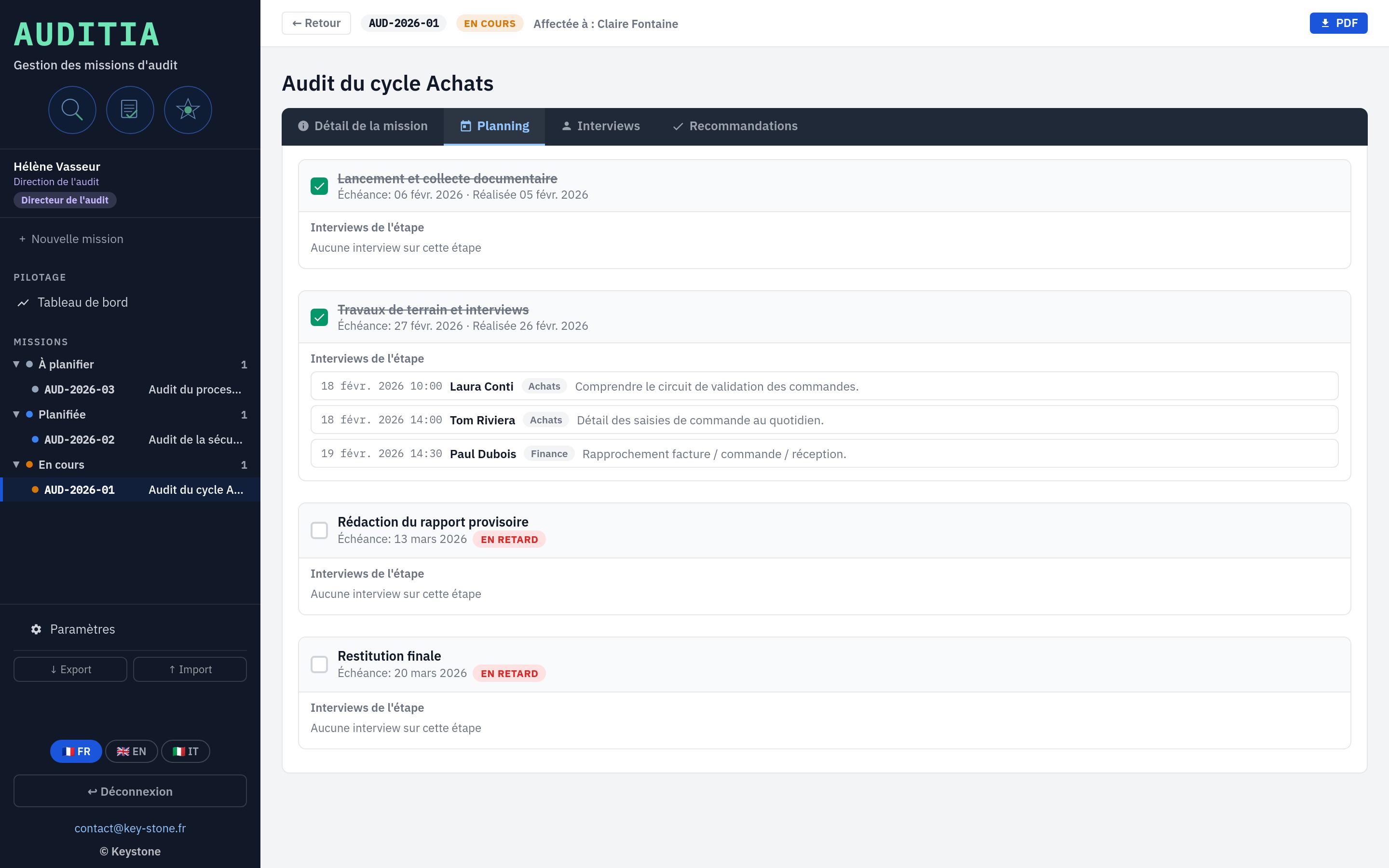
The engagement breaks down into dated steps: framing, reviews, reporting. Each step carries its due dates and anchors the interviews and findings that follow.

  • Schedule steps with due dates
  • Engagement status, from To plan to Completed
  • Audited units and lead auditor
key-stone.fr/auditia
Auditia, schedule of an audit engagement in steps
02 · Interviews

Attach interviews to the schedule

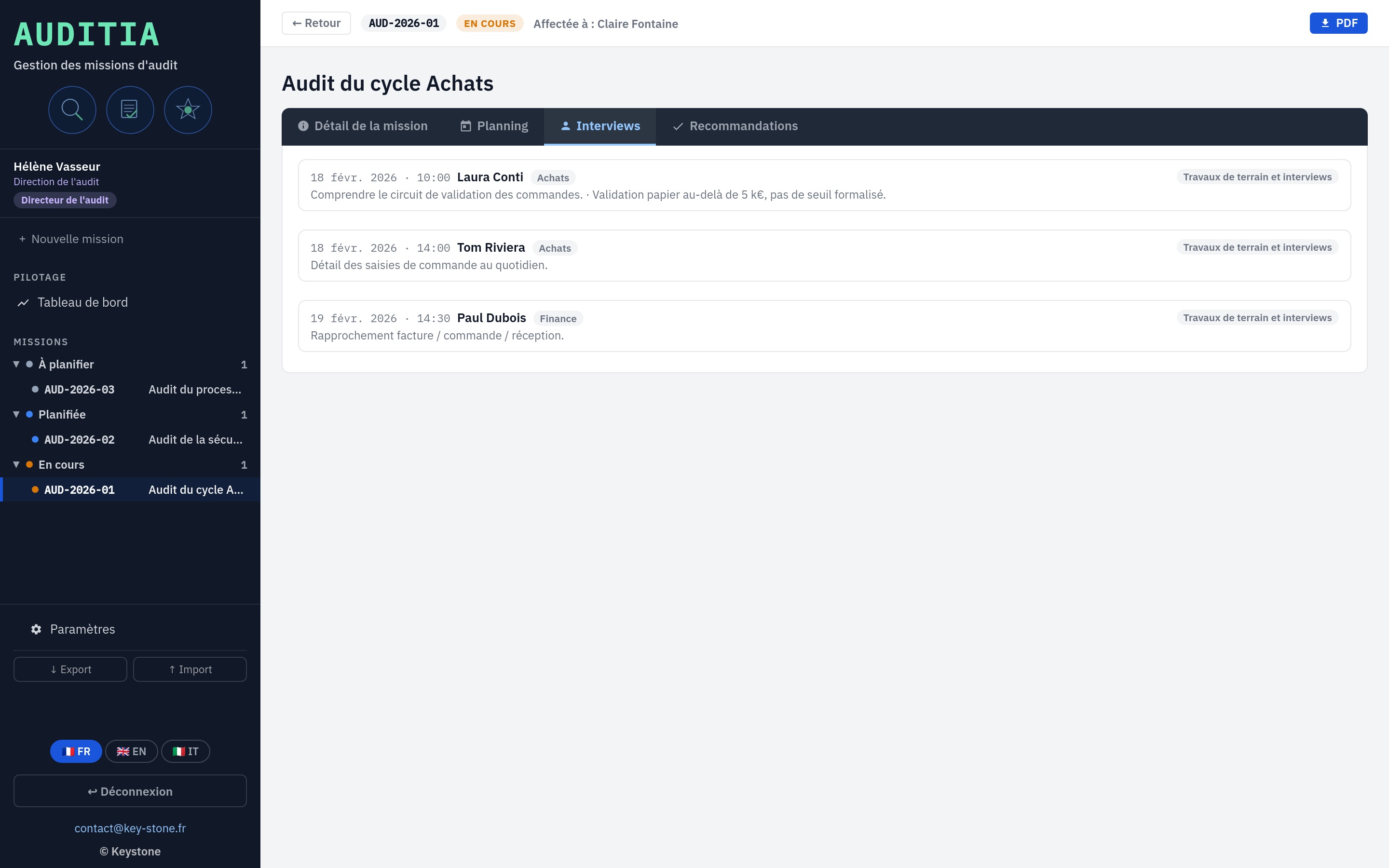
Each interview attaches to a step: person met, unit, date, objective and notes. Everything stays in one place, tied to the engagement, instead of drifting across scattered files.

  • Interviews linked to the schedule steps
  • Person, unit, date and objective
  • Interview notes kept with the engagement
key-stone.fr/auditia
Auditia, interviews attached to the engagement steps
03 · Recommendations

Code and circulate the recommendations

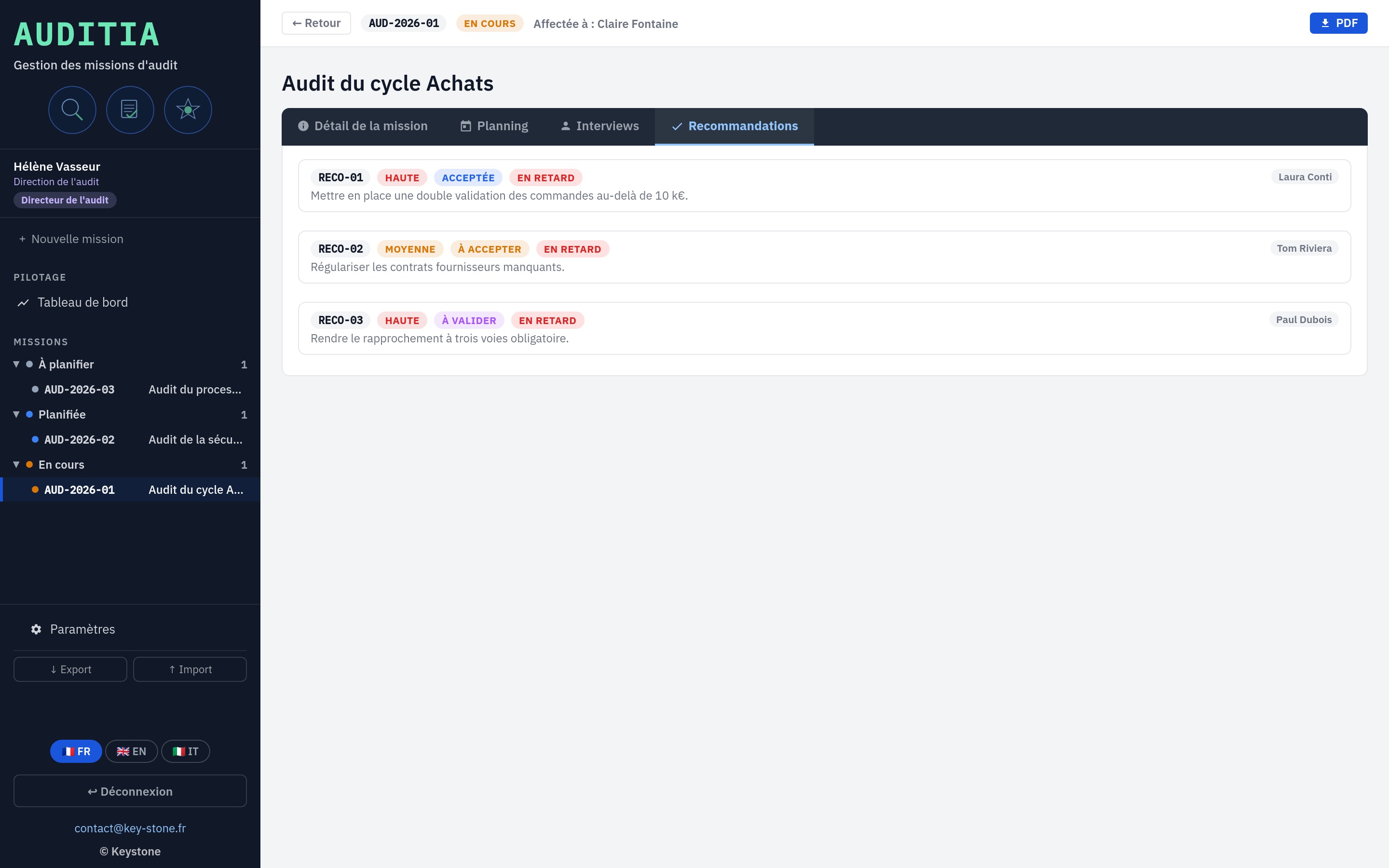
Each recommendation carries a finding, an action, an owner, a priority and a due date. It is coded automatically (RECO-01, RECO-02) and follows its cycle: the auditor writes, the director validates, the manager accepts and completes.

  • Automatic coding per engagement
  • Finding, action, owner, priority, due date
  • Validation cycle across the three roles
key-stone.fr/auditia
Auditia, coded recommendations and their validation cycle
04 · Dashboard

Steer progress at a glance

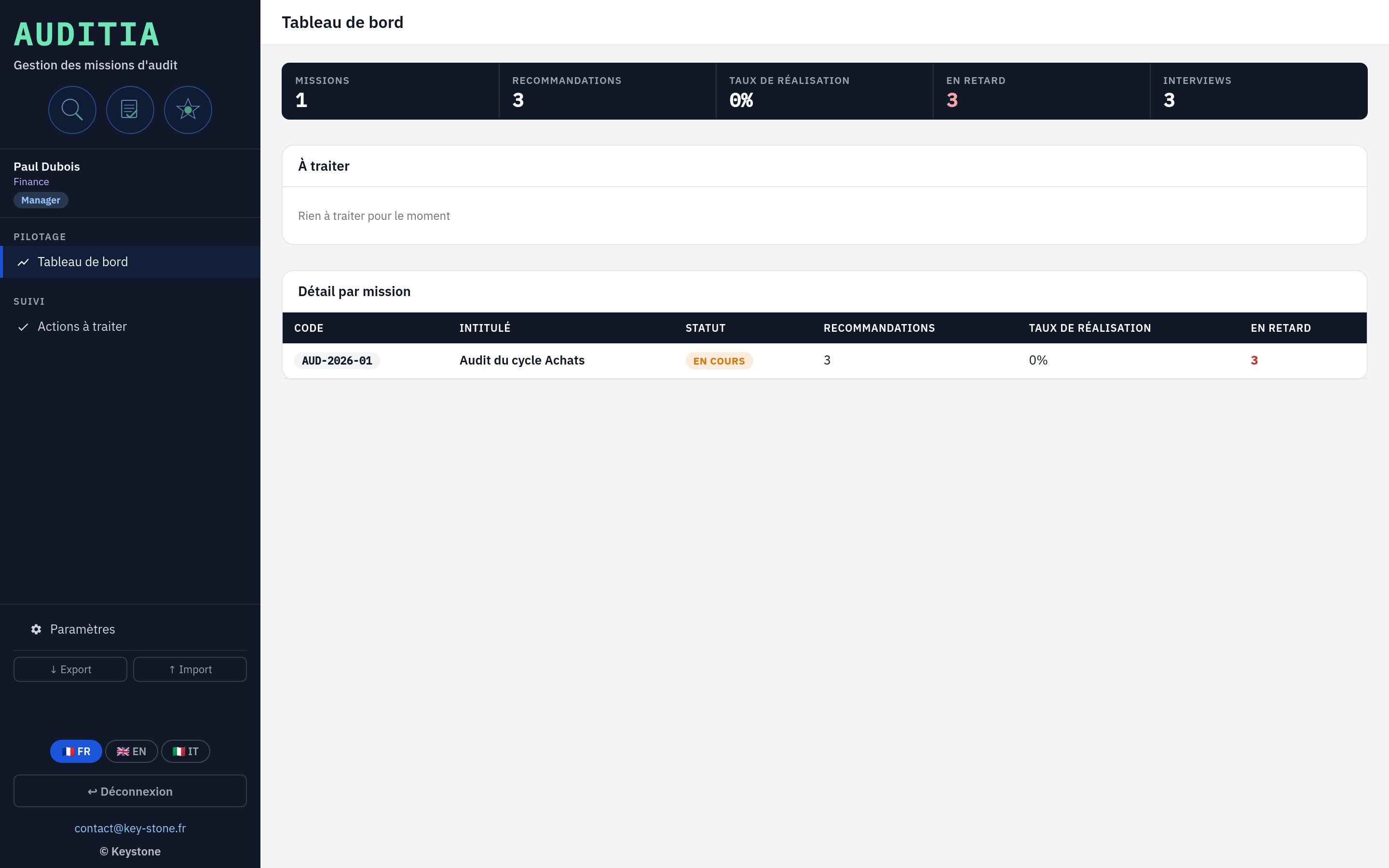
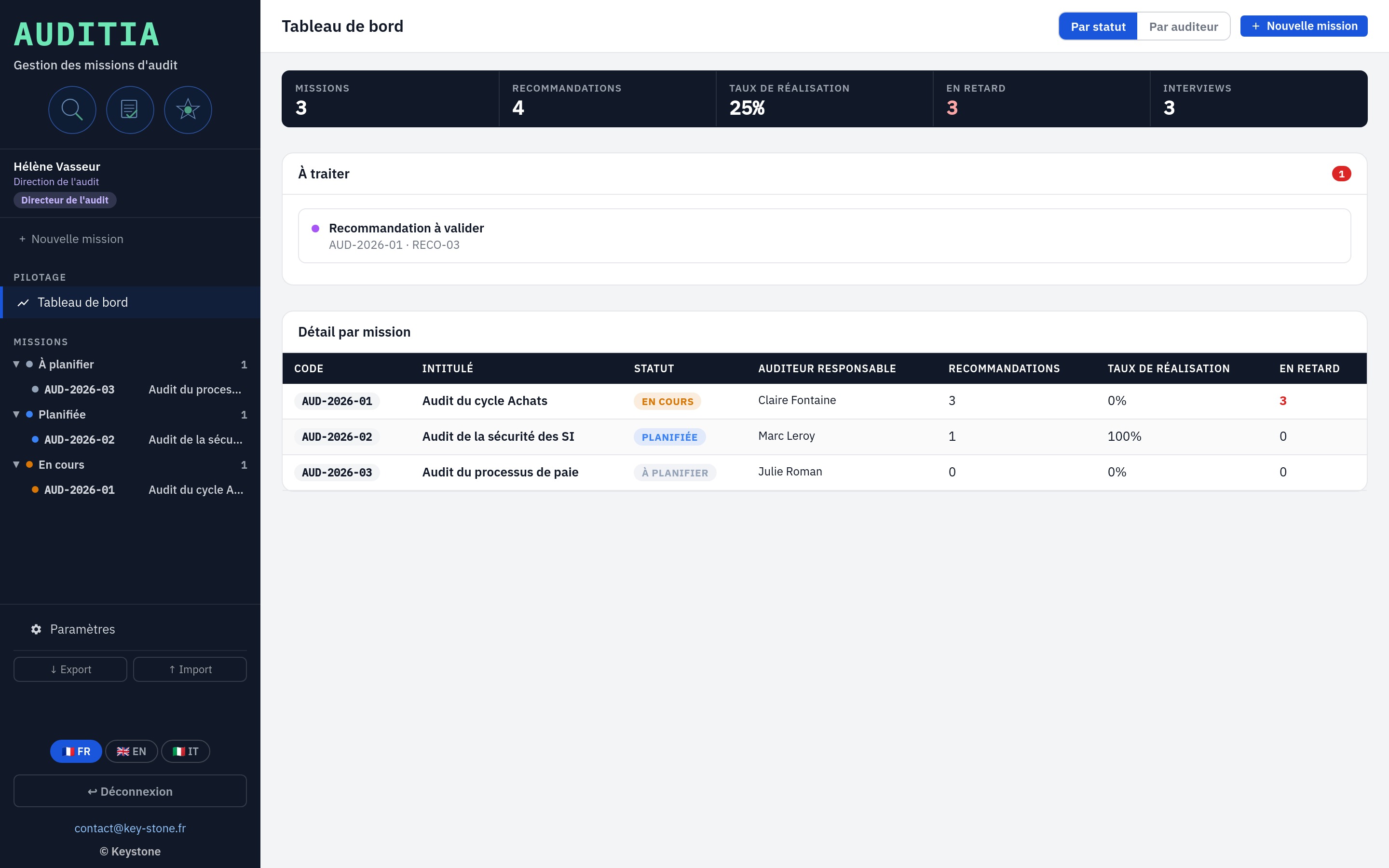
The dashboard gathers the essentials: number of engagements, recommendations, completion rate, overdue items and interviews. The To handle banner surfaces to each person what awaits their action.

  • Engagements, recommendations, completion rate, overdue items
  • Role-based notifications in the To handle banner
  • Detail by engagement, view by status or by auditor
key-stone.fr/auditia
Auditia, dashboard for steering engagements
05 · Reporting

The engagement and action plan, as PDF

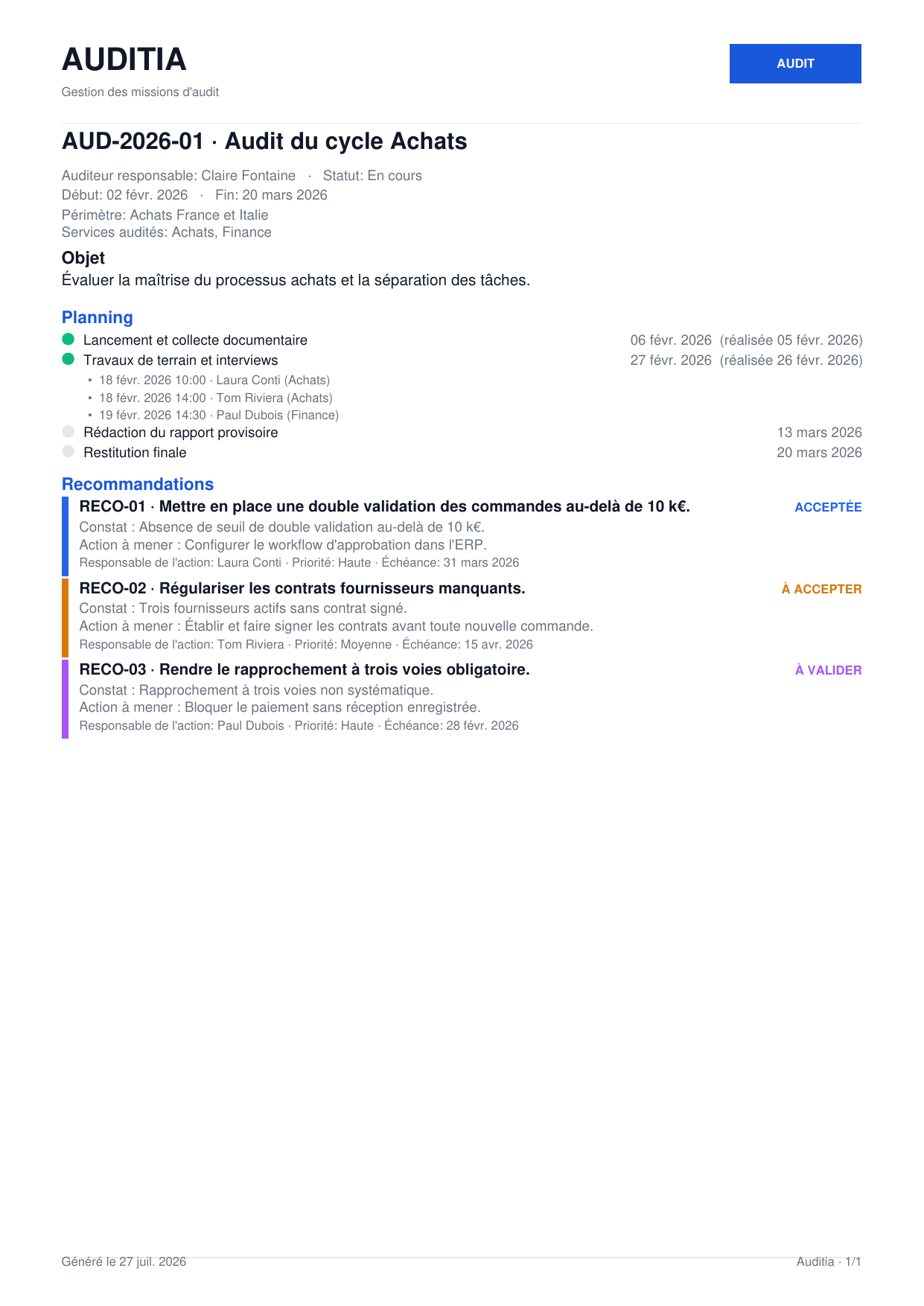
The engagement exports to PDF: general information, schedule, interviews, then the recommendations with their status. The action plan exports separately, ready to share with the managers concerned.

  • PDF export of the full engagement
  • Action plan exportable separately
  • Documents ready to share and archive
Auditia, engagement exported to PDF
Automatic coding. Recommendations numbered RECO-01, RECO-02, restarting from 01 for each engagement.
Overridable validation. Director validation, a default setting, can be changed when creating each engagement.
PDF export. The engagement and action plan, laid out, ready to share.
Export and import. Save and reload the data between machines, as JSON.
03
The three roles

From the auditor to the audit director

A recommendation does not live alone. Auditia splits the cycle across three roles: the auditor writes, the audit director validates, the manager accepts and completes. Each sees what they have to handle.

01 · Auditor

Plan, interview, recommend

The auditor runs the engagement in the field: sets the schedule, conducts the interviews, writes the findings and recommendations, then submits them for validation.

  • Engagement schedule and interviews
  • Drafting of findings and recommendations
  • Submission to the director for validation
key-stone.fr/auditia
Auditia, the auditor's screen
02 · Manager

Handle the actions of their unit

The manager receives the accepted recommendations for their unit. They track the handling, record completion, and escalate what is blocked.

  • Recommendations limited to their unit
  • Tracking and recording of completion
  • Feedback to the director if needed
key-stone.fr/auditia
Auditia, manager view of their unit's actions
03 · Audit director

Assign engagements, validate recommendations

The audit director keeps the overview: creates and assigns engagements, validates recommendations before they reach the managers, and follows the steering.

  • Creation and assignment of engagements
  • Validation of recommendations
  • Steering view across all engagements
key-stone.fr/auditia
Auditia, audit director view across all engagements
04
Highlights

Light, self-contained, yours

Free

Local prototype

Explore the tool and how it works, at no cost and no commitment.

No install

In the browser

One file, no software to install, no account to create.

Privacy

Data stays local

Everything stays in your browser. No data is sent to a server.

Languages

Trilingual

Interface in French, English and Italian.

Reporting

PDF export

The engagement and action plan, laid out, ready to share.

Tracking

Traced cycle

Each recommendation follows a clear, tracked validation path.

05
Who it is for

Those who run the audits

Auditia is for those who run audit engagements and track their recommendations.

Head of internal audit Internal auditor Internal control manager Compliance manager Executive management Audit firm and consultant
06
Keystone services

The tool is free. Rolling it out is an engagement.

Exploring Auditia locally costs nothing. Adapting it to your units, your audit method and your validation flows takes support. That is Keystone's role.

01

Framing the approach

Define the roles, the audited units and the recommendation validation cycle.

02

Configuration

Units, members, coding and validation rules aligned with your organisation.

03

Audit method

Structure planning, interviews and the action plan against your standards.

04

Training

Make your teams self-sufficient on the tool and on running engagements.

05

Recommendation tracking

Set up the steering of recommendations and overdue items over time.

06 · Deployment

Auditia in network mode

A hosted version where the auditor, the managers and the audit director work on the same base, with no file exchange. Access rights, centralised data, sovereign hosting if needed.

Write to Keystone contact@key-stone.fr
Auditia

Try it on your engagements.

Open the tool, browse the sample engagement, then replace it with your engagements and recommendations. In a few minutes, you steer an audit end to end.